Constraint Type "Formula"
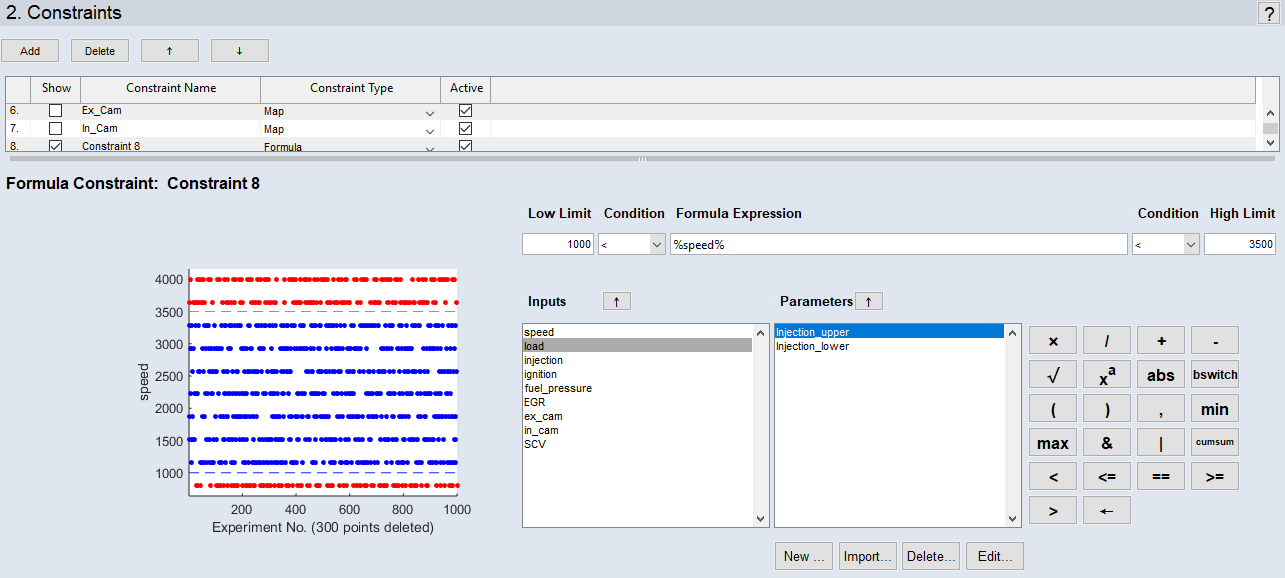
The area below the constraints list contains the graphic display of the planned measurement points and the specified limitation of the area.
In case of undesired measurement regions that depend on complex dependencies amongst inputs, map/curve-based constraints may not help. But, if the dependency can be described as a mathematical condition amongst inputs and/or loaded parameters, formula-based constraints can be applied.
Formula Definition
Use the "Low Limit" and "High Limit" fields to specify lower and upper limits for the formula. The fields require scalar numerical inputs.
Use the "Condition" combo boxes to select comparison operators. Available operators are none (if you want to specify no lower or upper limit), < (less than) and <= (less or equal).
Use the "Formula Expression" field to enter the formula. Variables can be either inputs or curves/maps (1D or 2D) that are selected and managed in the "Inputs" area and the "Parameters" area. Operators are entered directly or via the  button area.







|
Note |
|---|
|
Complex numbers and NAN are not allowed as formula results. If your formula results in a complex number or NAN, a warning is issued in the plot area and in the log window. Correct your formula. |
If the expression is violated, the corresponding measurement points are rejected. The effects of the limits created by the formula on the measurement points is displayed graphically on the left. The number of measurement points that are removed through all active constraints is given in the x axis label of the plot.
In the case of a multi-point injection in which the injection times "T_1" and "T_2" are to be measured, you must ensure that (for an injection period "Delta_T") the following condition is adhered to:
T_1 + Delta_T < T_2
In addition to the inputs "T_1" and "T_2", "Delta_T"can be defined as a map which is a function of other inputs (or even of existing maps).
Inputs and Parameters
The "Inputs" list shows all inputs of the experiment plan that can be inserted in the "Formula Expression" field, either by typing its name or via the  button.
The "Parameters" list shows all maps of the experiment plan that can be inserted in the "Formula Expression" field, either by typing its name or via the button. The buttons below the "Parameters" list can be used to create, import, delete, and edit a selected map.
See also