Promoting Messages
Information and warning messages from the code generator do not interrupt the code generation process. The relevant context of a project may require a stricter interpretation for some information or warnings, which is why it is possible to promote information or warnings of one type, either for a particular project or on a global level. Unless specified otherwise, global configurations override project-specific configurations.
Information and warning messages issued during AMD/AXL import do not interrupt the import process. AMD/AXL import messages can be promoted only on a global level.
The table below shows the possible promotions.
Promote | Information | Warning | Error message | |
Information | possible | possible | ||
Warning | --- | possible | ||
Error message | --- | --- |
 to
to 
The identifier of a promoted message remains unchanged which is why promoting does not affect showing/hiding messages.
If a hidden message is promoted, it is displayed again.
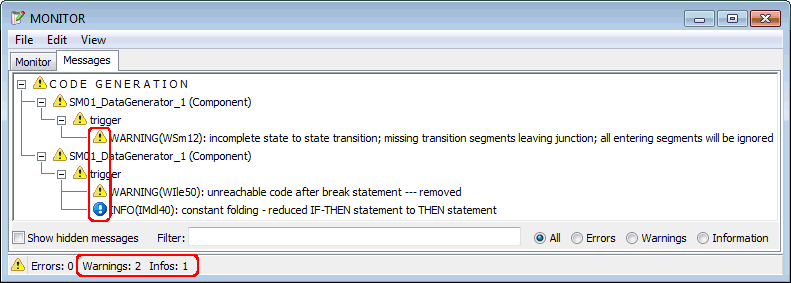
The following figures are intended to clarify promoting. The  first figure shows two warnings and an information message as they are issued by code generation.
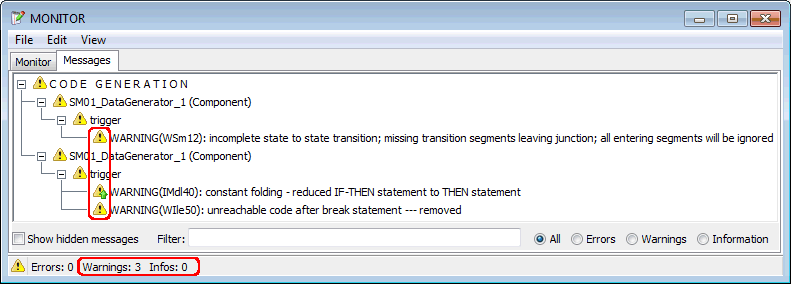
In the second figure, the information has been promoted to a warning. The type remains the same – IMdl40 –, but the message is assigned the icon for warnings with an indication that this warning is promoted information:  In the Messages tab, three warnings are displayed and counted.
In the third figure, the first warning has been promoted to an error message. The type remains the same – WSm12 –, but the message is assigned the icon for error messages with an indication that this is a promoted message: 
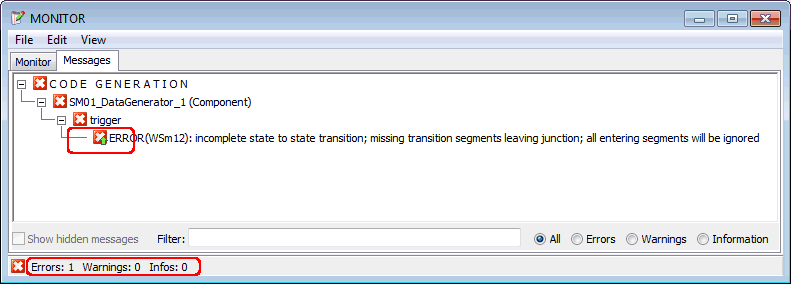
Promotion to an error message causes code generation to abort at this point, it does not reach the stage of the second message. This is why only one error message is displayed in this case in the Messages tab.
See also
Promoting Information and Warnings
Promoting Information and Warnings (Monitor Window)
Revoking a Promotion (Configuration Windows)