Messages Tab
The Messages tab displays the results of code generation and compilation, analysis of diagrams, and AMD/AXL import, in a tree view. Unlike the Monitor tab, only the results of the last operation are displayed here.
The tab contains the following elements:
display field
Three types of messages issued in the named operations are displayed: Errors ( ), warnings (
 ) and information (
 ). The different types of messages are distinguished by abbreviations, e.g. WSm60 or IMdl40. The display for every operation is ordered in a tree structure according to components and methods/processes.
To make it easier to localize the problem areas, the errors and warnings displayed are also links to the problem areas.
Show hidden messages option
If activated, hidden messages (see Hiding Messages (Monitor Window)) are displayed.
Filter field
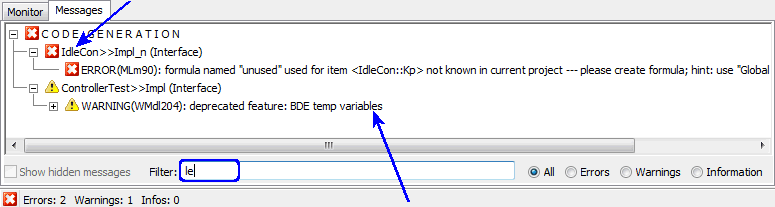
Filters the Messages tab. The filter is caps-insensitive; it uses type-ahead mode. A message is shown if it contains the search string, or if its parent contains the search string. See also Filtering the Messages Tab.
 EXAMPLE EXAMPLE |
|---|
All / Errors / Warnings / Information options
Only messages of the selected type are shown.
See also
Displaying the Cause of the Message
Hiding Messages (Monitor Window)
Saving the Content of the Messages Tab
Saving the Content of the Messages Tab under a Different Name