Memory Page Manager Window
The user interface of the Memory Page Manager  consists of the following components:
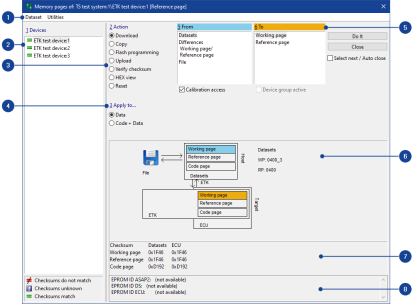
 1 Dataset and Utilities MenuDataset menu
This menu contains the following functions:
Change Working Data Only
Opens the Select working data for device dialog box, in which you can select a new working dataset.
If you select a reference dataset, a new dataset is created and used as the working dataset.
Change Reference Data Only
Opens the Select reference data for devicedialog box, in which you can select a new reference dataset.
If you select the current working dataset, this is defined and used as the reference dataset. A new working dataset is created.
Freeze Working Data
Opens the Freeze working data for device dialog box in which you can specify a name for the new reference dataset.
The working dataset is defined as the reference dataset, and a new working dataset is created.
Save Working Data As
Opens the Save working data for devicedialog box, in which you can specify a name for the new working dataset.
You can specify a new name or overwrite an existing dataset.
Write Dataset to File
Saves the selected dataset to a HEX file.
Working Page Only | Opens a dialog box in which you can enter a file name. |
Working Page and Code Page | Opens a dialog box in which you can enter a file name. |
Reference Page Only | Opens a dialog box in which you can enter a file name. |
Reference Page and Code Page | Opens a dialog box in which you can enter a file name. |
Close
Exits the Memory Page Manager.
Utilities menuThis menu contains the following functions:
Configure ProF
Opens the Browse ProF Configurations dialog box, in which you can manage the ProF configurations.
Note |
This menu function is available only if the ProF Toolbox is installed. |
2 Devices List BoxSelect the device for which you want to perform the selected action. Note that the action process may take longer if you select more than one device.
The Device field lists all the ECUs of the current hardware configuration, including the the checksum calculation status:
 | The checksums of the source data do not match the checksums of the destination data. |
 | The checksums are unknown. |
 | The checksums of the source data match the checksums of the destination data. |
3 Action List BoxDefines the action you want to perform. You have the following options:
Action | Description | ||
Download | Loads the working dataset, reference dataset and/or code page to the control device memory. The data can also be loaded from a HEX file. This is a default action if the checksums of the INCA datasets differ from the checksums of the ECU datasets. | ||
Upload | Reads the working dataset, reference dataset and/or code page from the control device memory. | ||
Equalize | Loads all valid calibrations from the dataset to the control device memory, then loads the calibrations that are unknown in the dataset from the control device memory to the dataset.
| ||
Copy | Copies the working dataset to the reference dataset or vice versa. | ||
Flash programming | Programs the flash EPROM in the ETK or the control device with the contents of the working or reference dataset and the code page. This action uses the integrated program ProF. | ||
Verify checksum | Calculates the checksums for the working dataset, reference dataset and/or code page. | ||
Hex.view | Opens the HEX Editor window, in which you can view, edit and compare the working dataset, the reference dataset or the code page. | ||
Reset | Addresses the reset of the control device. This action is not supported by most control devices. |
4 Apply to List BoxDefines to which items the selected action shall be applied, for example, to data pages only, or to program pages and data pages.
5 From/To List BoxDefines the data source for the action (underlaid blue). Depending which action you selected the following options are available:
| Datasets | Datasets from the database. |
|---|---|
| File | Datasets from a HEX file. |
| Differences | Only write the differences between the working dataset
and the reference dataset to the ECU memory. The Differences source is available
only if the following conditions are met: Reference dataset (INCA database/HEX file) = reference dataset (ECU) and reference dataset (ECU) = working dataset (ECU) |
Working page | Only write the working page dataset to the ECU. |
Reference page | Only write the reference page dataset to the ECU. |
Defines the destination for the action, but only for actions with available source and destination (underlaid orange).
6 Visual DisplayDisplays the selected action and the defined sources (underlaid blue) and destinations(underlaid orange) visually.
Enables visual checking of the action to avoid operating errors.
7 Checksum DisplayDisplays the checksums of the datasets. If the calculated checksums of the datasets are different, the corresponding datasets are underlaid red.
8 EPROM ID DisplayDisplays the EPROM identifiers. An EPROM identifieris a string that can be edited in both the HEX file and the A2L file.This identifier allows you to check whether the data matches the existingdescription. If the check finds a mismatch, a warning is displayed.
The window contains the following checkboxes:
Calibration access
Defines whether the action is to access the memory of the control device. Activate this option if you also want to copy in the ECU memory.
Device group active
Activates or deactivates the grouping of the device if you have grouped the device in the Hardware Configuration Editor.
Select next / Auto close
Select next selects the next device whose checksums do not match after completing an action such as flashing or downloading. Auto close closes the Memory Page Manager when the checksums of the last device match.
The window contains the following buttons:
 Do It
Do It
Performs the set action.
Close
Exits the Memory Page Manager.
See also
Starting the Memory Page Manager