EE – Variable Placeholder (SP4)
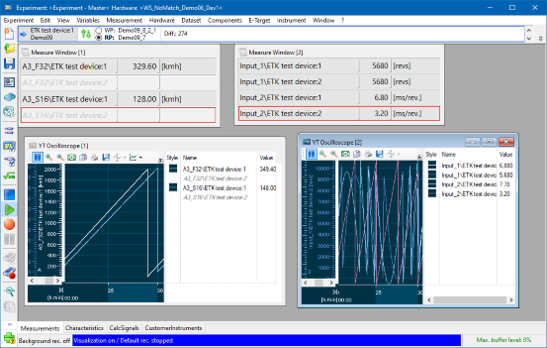
If you use experiments with multiple hardware configurations in INCA, not all variables used are always available across the different configurations. To address this issue, INCA has therefore implemented a new placeholder concept that allows these variables to remain visible even when they are not used in all hardware configurations.
In INCA, the following now applies to the behavior of these variables:
Grayed out variables indicate that they are missing in the current configuration.
These variables remain in the saved experiment.
The variables will become fully active when they are reused with a hardware configuration that supports them.
INCA distinguishes between no-match and inactive variables as follows:
No-match |
|
|---|---|
Inactive |
|
This feature is supported for the following INCA modules:
Standard and customer instruments
Calculated signals
Recorders
Triggers
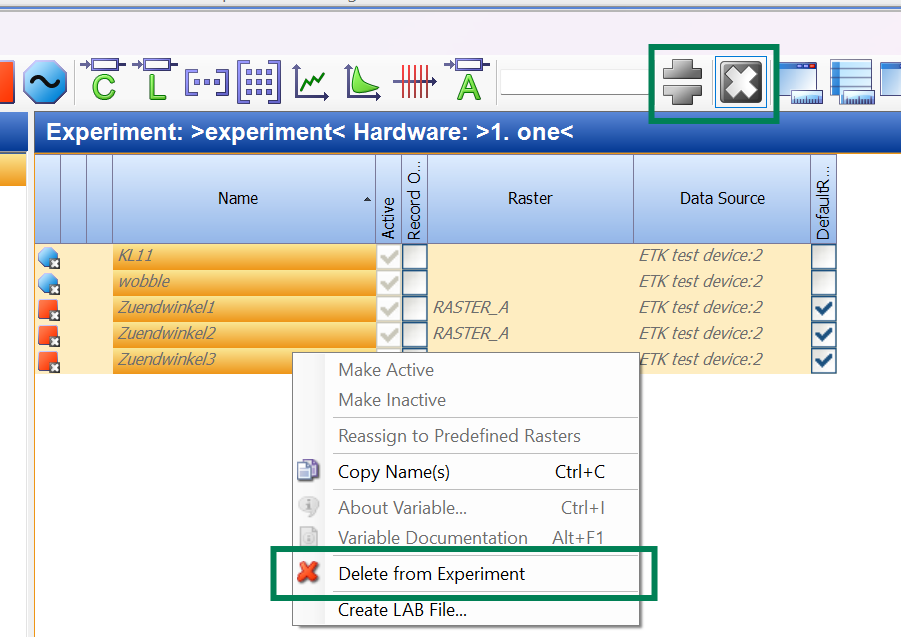
Enable Fast Deletion of Placeholders in the Variable Selection Dialog
In the Variables Configuration of the Variable Selection Dialog, it is possible to use new filters and show only no-match variables, select them all (Ctrl+A) and delete them from the Experiment.
New filters
No-match variables
Inactive variables
The no-match and inactive variables shown grayed out and marked with overlay icons.
Compatibility and Limitations
INCA maintains compatibility across different versions. When opening an INCA experiment which contains variables in inactive or no-match states in INCA version before V7.5.4, the following adjustments occur:
Inactive variables are re-activated and displayed.
No-match variables are removed and no longer displayed.
The Trigger Editor does not support variables in inactive or no-match states.
When using INCA experiments starting from version 7.5.4 some limitations apply:
Outdated oscilloscopes are converted to the current version. To support working with models, the current oscilloscope is enhanced with simulation time support, which stops when no samples come in.
The recording cannot be started
when the recorder contains only variables in inactive or no-match states.
when the trigger input is a variable in inactive or no-match states.
In the Calibration Scenario Editor, no-match variables are removed and lost when you save the Experiment, see Calibration Scenario Editor.
In customer instruments, you need to update your instruments if you want it to support no-match and inactive variables.
This feature is deactivated by default. To activate this feature, select  > Experiment tab > Show no-match and inactive variables > Yes.
See also
Removing Variables from Measure/Calibration Windows
Activate or Deactivate a Variable
Removing Variables from the Experiment
Back to