Variable Status in INCA
In INCA, variables are utilized and displayed in various ways across different INCA editors and INCA instruments. INCA ensures that variables remain visible in the editor or instrument, even after becoming inactive or entering a no-match state.
If you use experiments with multiple hardware configurations in INCA, not all variables used are always available across the different configurations. To address this issue, a new placeholder concept has therefore been implemented in INCA. This allows these variables to remain visible even when they are not used in all hardware configurations.
Because of the placeholder concept, Experiments automatically adjust when certain variables become unavailable. Instead of variables being removed entirely, they remain in the Experiment. The variables only change their state. This process ensures smooth transitions and prevents disruptions in the Experiment flow.
Variables Status Types
INCA uses three different statuses for variables, which are displayed in various instruments with distinct formats:
Status | Color | Font style | Description |
|---|---|---|---|
Active | Black | Regular | Measurement and calibration variables are available and fully functional. |
Inactive | Grey | Italic | Measurement variables are available in the description file but not activated for measurement, for example, due to a full raster or deactevated hardware, see Setting the Variable State. Detailed variable information is available, but no values are available. |
No-match | Grey | Italic | Measurement and calibration variables are either missing in the description file (A2L) or the corresponding hardware is unavailable, see INCA Automatically Sets Variables to No-Match. Detailed variable information is not available. |
The placeholder concept is supported for the following INCA modules of the Experiment Environment:
Standard and customer instruments
Calculated signals
Recorders
Triggers
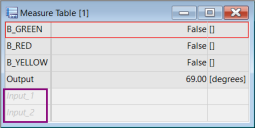
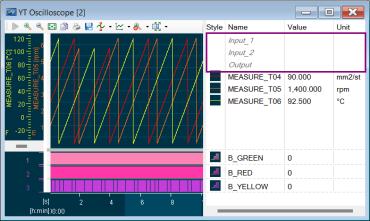
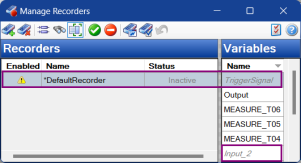
Variable status displayed in a Measure Table, in an Oscilloscope, in the Variable Selection Dialog, and in the Recorder Manager. To differentiate between no-match and deactivated variables, hover over the variable to display the tool tip.
Experiment Environment - Measure Table
Variable Selection Dialog

Experiment Environment - Oscilloscope
Recorder Manager
Key Behavior of Variables
- The variables status can be set through various methods, see Variable Status in INCA.
You can remove Inactive or no-match variables. To remove a variable in the INCA Experiment, see Removing Variables from Measure/Calibration Windows. To remove a variable in the Variable Selection Dialog, see Removing Variables from the Experiment.
Variables remain in the rasters and on the device where they were originally selected, regardless of their status.
Setting the Variable State
Variables in INCA can be set to an inactive or no-match state through various methods. Below are the different use cases and scenarios where variables are set:
Set Variables to Inactive Manually
If you manually set variables to inactive, the variables remain listed in the Experiment but cannot be measured or recorded. Additionally, these variables are excluded from the raster check calculations. To activate or deactivate a variable, see Activate or Deactivate a Variable.
Why do you deactivate variables:
- Freeing up raster space to add more measurement variables.
- Blocking calibration access (applicable until INCA version 7.5.0).
INCA Automatically Sets Variables to Inactive
In some cases, INCA will automatically set variables to inactive when an Experiment is opened and there is not enough raster space to accommodate all variables. This can occur when switching between different ECU projects that have varying capacities for measuring variables. For example, when an experiment created with ETK calibration access, which can measure more variables, is later used with CCP calibration access, some variables may not fit into the rasters and will be set to inactive.
INCA Automatically Sets Variables to No-Match
The no-match state is a special form of inactive state that is set exclusively by INCA. This occurs when variables in an Experiment do not match the devices in the current workspace.
Why does variables get set to no-match:
The ECU project (description file, A2L) has changed, causing variable names to differ.
Hardware devices previously used in the Experiment have been removed.
Compatibility and Limitations
INCA maintains compatibility across different versions. When opening an INCA experiment which contains variables in inactive or no-match states in INCA version before V7.5.4, the following adjustments occur:
Inactive variables are re-activated and displayed.
No-match variables are removed and no longer displayed.
The Trigger Editor does not support variables in inactive or no-match states.
When using INCA experiments starting from version 7.5.4 some limitations apply:
Outdated oscilloscopes are converted to the current version. To support working with models, the current oscilloscope is enhanced with simulation time support, which stops when no samples come in.
The recording cannot be started
when the recorder contains only variables in inactive or no-match states.
when the trigger input is a variable in inactive or no-match states.
In the Calibration Scenario Editor, no-match variables are removed and lost when you save the Experiment, see Calibration Scenario Editor.
In customer instruments, you need to update your instruments if you want it to support no-match and inactive variables.
See also
Removing Variables from Measure/Calibration Windows