Step 2: Constraints
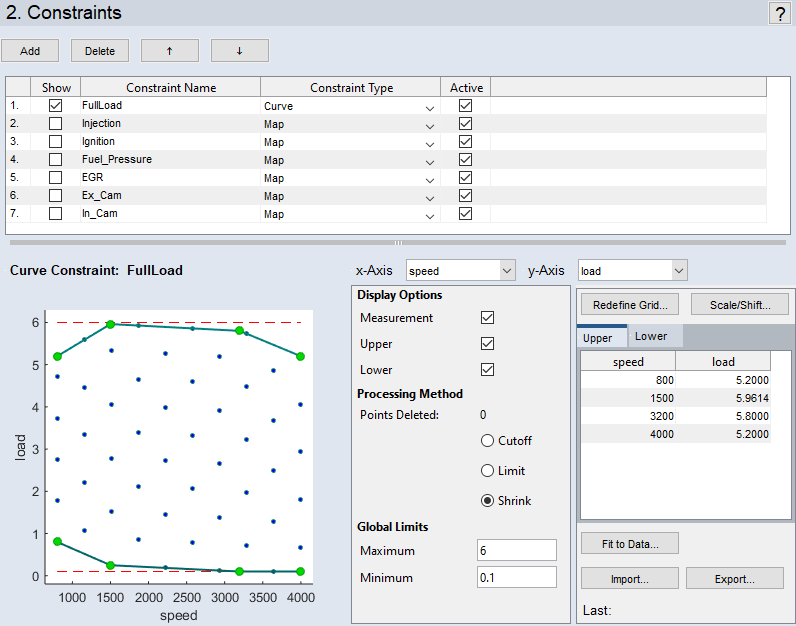
This step deals with constraints of the measurement range of a variable as a function of other variables. For example, it may be desirable to avoid high loads in case of high rotational speeds.
The following constraint types are available:
- Curve/Map – the value range of a variable is constrained by a function of one (Curve) or two (Map) other variables
- Formula – the value range of a variable is constrained by a function of other inputs and loaded maps/curves
- Hull on imported Data – the value range of a variable is constrained by using a 5D-convex hull based on a data points cloud coming from a real measurement campaign (Boundary Search)
- Classifier
In the "Constraints" Step, these conditions can be added (also imported), visualized, configured, and deleted again.
Adding constraints
Clicking on Add adds a new row to the list. The following information is required for the specification:
- Constraint Name
Name of the condition to be constrained - Constraint Type
Map, Curve, Formula or Hull on imported Data
Deleting constraints
Clicking on Delete removes the selected row.
Showing/selecting constraints
Via selection in the Show column, the selected constraint is shown below the list. You can edit the constraint in that area.
Activating/deactivating constraints
Via selection in the Active column, the selected constraint is activated or deactivated for processing.
Sorting constraints
With the Move Up and Move Down
 buttons you can change the order of the constraints in the list. This order determines the order in which the constraints are processed.
See also
Constraint Type "Hull on imported Data"