Main Window of ASCMO-DYNAMIC ExpeDes
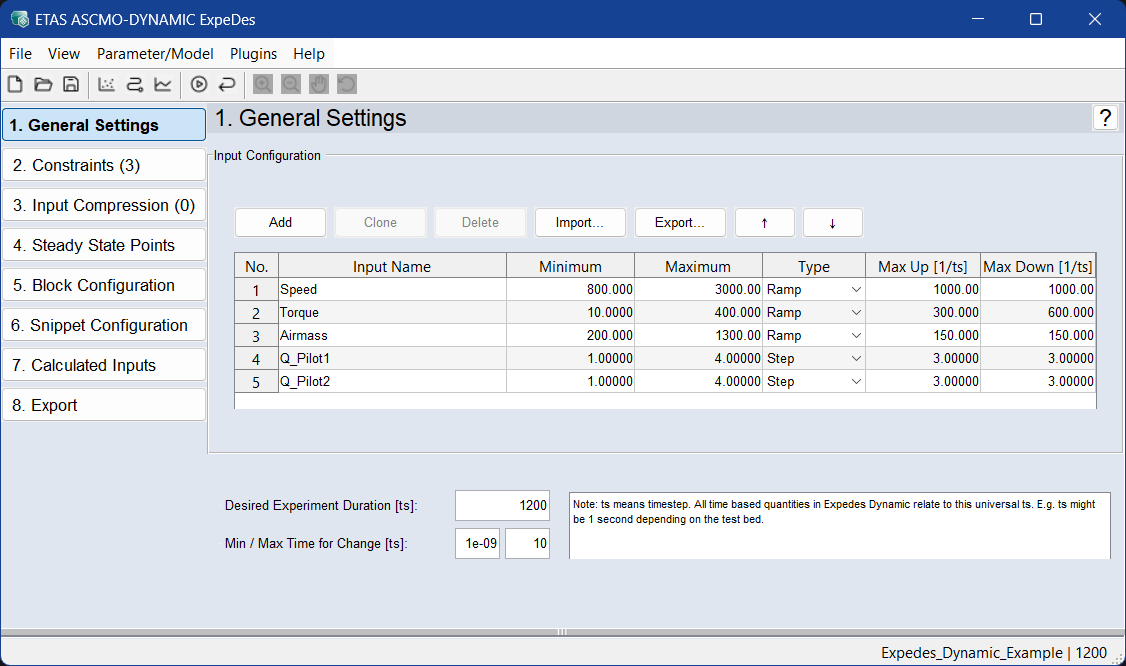
The main menu of ASCMO-DYNAMIC ExpeDes features the following entries:
 main toolbar
-
 New Project
 Opens the ASCMO-DYNAMIC ExpeDes start window, where you can create a new project.
-
 Open Project
Opens an ASCMO-DYNAMIC ExpeDes project (*.exde).
-
 Save
SaveSaves the current ASCMO-DYNAMIC ExpeDes project.
-
 Apply changes and open Scatter Plot
Recalculates the modified experimental design and presents it in a scatter plot window (View → Scatter Plot).
-
 Apply changes and open Density Plot
Recalculates the modified experimental design and presents it in a density plot window (View → Density Plot).
-
 Apply changes and open Scope View
Recalculates the modified experimental design new and presents it in a Scope View (View → Scope View).
-
 Apply changes and update viewer
Updates the representation in the Viewer windows when changes are made to the project.
-
 Revert changes in current step
Changes in the current step are undone.
-
 Zoom In* and
  Zoom Out*
 Enlarges/shrinks the illustration in the plot.
-
 Pan*
Pan*The plot can be shifted within the window.
-
 Rotate 3D*
The 3D plot can be rotated in all three spatial directions.
Note
* Only active if the current window contains a plot.
button bar
The buttons open the respective working steps.
The current working window
In the main part of the window, functions of the currently selected work step are shown.
The Log window
In this area, status and error messages and tips are issued.