Perform Optimization
Once all parameters and conditions have been defined, optimization can be carried out.
|
Note |
|---|
|
The Calibration menu is only available, if operating point axes have been selected during data import (see Assign Inputs and Outputs). You can set the operating point axes afterwards in the menu In/Outputs > Set Operating Point Axes. |
-
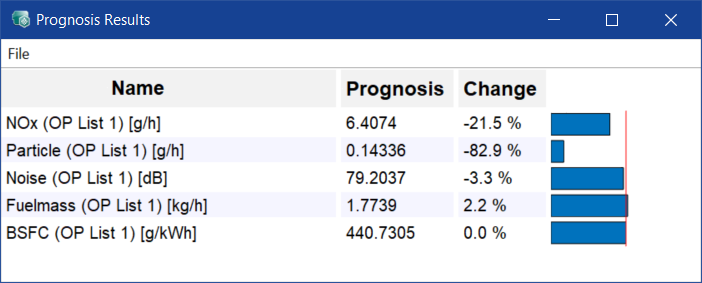
Before you start the optimization, open the Prognosis Results window (cf. Perform prognosis without editing calculation rules).
This window shows the forecast for all output values before optimization with the current (non-optimized) application parameters.
-
In the Global Optimization window, click Optimize to perform the optimization.
The result is shown in the Prognosis Results window after optimization.
-
Edit the weighting of Fuel_mass or the other criteria and repeat the optimization.
-
The prognosis results change.
Checking calibration maps
- Select Calibration > Calibration Maps > Open all Maps to check whether the maps are acceptable as they are or whether they have to be smoother.
-
If necessary, do the following to increase map smoothing:
- In the Global Optimization window, click CM Smoothing Weight.
-
In the Map Smoothing window, adjust the values for smoothing the maps.
You can enter values between 0 (no smoothing) and 1 (very strong smoothing).
-
If necessary, do the following to minimize map gradients:
- In the Global Optimization window, click Minimize CM Gradient Weight.
-
In the Minimization of Calibration Map Gradient window, adjust the weights for minimizing the map gradients for both axes.
You can enter values between 0 (no minimization) and 1 (very strong minimization).
-
If necessary, do the following to limit map gradients:
-
In the Global Optimization window, click Constrain CM Gradient.
-
In the Limitation of Calibration Map Gradient window, activate the checkboxes for each input whose gradients you want to limit.
You can limit the gradients on each operating point axis separately.
- In the input fields, enter the lower and upper limit for the gradients of each input and operating point axis.
-
-
Repeat the optimization.
This process of optimization, checking and changing weighting is carried out until the result corresponds to the requirements.