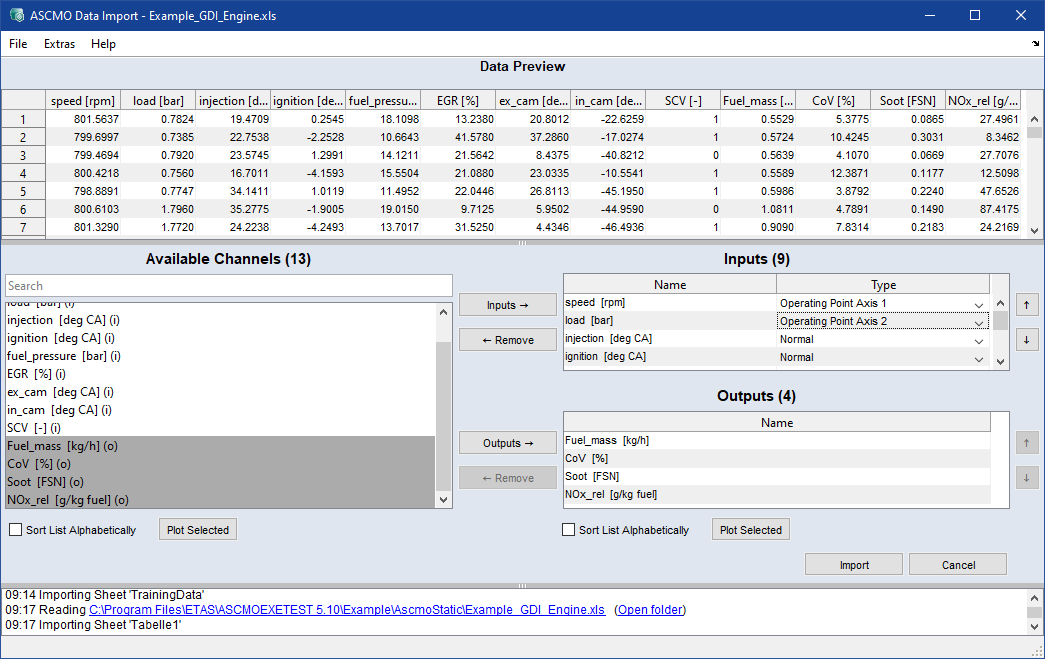
Assign Inputs and Outputs
Selecting input variables (Inputs)
To define the input variables of your model, proceed as follows:
-
Select the following measure variables (multiselection is possible):
- speed
-
load
-
injection
-
ignition
-
fuel_pressure
-
EGR
-
ex_cam
-
in_cam
-
SCV
-
Click
-
The variables are added to Inputs.
Selecting operating points (for global models)
For global models, the corresponding inputs must be declared as operating points.
-
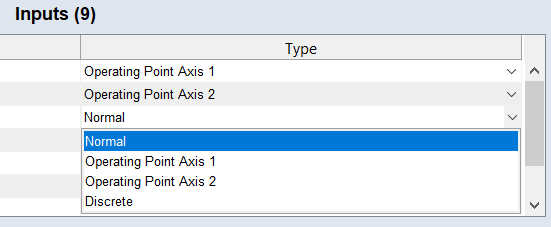
In the Type column for the inputs, select the following types:
Name
Type
speed [rpm]
Operating Point Axis 1
load [bar]
Operating Point Axis 2
SCV
Discrete
The other inputs use the type Normal.
Selecting output variables (Outputs)
Finally, define the output variables to be modeled:
-
Select the following measured variables:
- Fuel_mass
-
CoV
-
Soot
-
NOx_rel
-
Click
 .
. -
The variables are added to Outputs. The assignment of the training data is now complete.