Preparing the Optimization
In the Optimization Options area, you specify several parameters
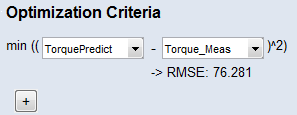
In the Optimization Criteria area, you specify the optimization target. Select a function node in the first dropdown and a data channel (or '0') in the second dropdown. The optimizer then tries to find a set of parameter values that minimizes the quadratic deviation of these two quantities.
The Local Constraints area is not used in this tutorial to keep the example in the tutorial simple. Depending on the optimization problem, these constraints can be used to guide the optimization in a specific direction.
-
In the Optimization Options area, do the following:
-
In the Number of Iterations field, enter a number of 40 iterations.
-
Increase the number of Multistart (Optimizer Options
 Configure) to prevent the optimizer from getting stuck in a local minimum.
-
-
In the Optimization Criteria area, do the following:
-
From the first drop-down list, select the function output TorquePredict.
-
From the second drop-down list, select the imported data channel Torque_Meas.
The flat parameters results in a high RMSE (see Variables RMSE and R2). After the first optimization, the RMSE will be significantly reduced.
You have the possibility to define a sum of such optimization criteria using the
 Add a new Optimization criterion button.
 -