NV-Data Mapping View
The NV-Data Mapping view contains the following elements.
Top Bar
information field
Shows whether NV data mapping is complete (
 ), incomplete (
 ), or contains invalid mappings (
 ).
).  Update
Updates the instances of the NVData interfaces, records, classes and modules, i.e. imports changes in these components into the SWC
 .
.- Auto-Mapping
Maps all unmapped non-volatile variables to NVData interface elements with identical type and names that match the pattern in the combo box.
combo box for auto-mapping pattern
In this combo box, you determine the pattern used for automatic mapping. See Automatic Mapping for details.

Opens the ASCET options window in the Appearance\Editors\Software Component node. In that node, you can adjust the patterns available for automatic mapping.
 /
/
Shows (
) or hides () the upper table.
Upper Table
This column lists all unmapped non-volatile variables of scalar, enumeration, array, matrix, or record type from all components directly or indirectly used in the software component. The NV variables
are displayed as follows:exported or imported NV variables
<variable>
local NV variables
self.<module>[.<nested module>...].<variable>
input field and
 button above the column
You can enter a text string in the input field and then click
to filter the list of available NV variables by name. The filter is case-insensitive; it finds all NV variables whose names contain the text string.An active filter is indicated by a green overlay icon:
 Click the button to remove the filter.
 properties filter above the column
Opens the Filter Criteria dialog window, which allows filtering the list by selected properties.
An active type filter is indicated by a green overlay icon on both filter buttons:

NV-Data Interface elements column
This column lists all unmapped NVData interface elements that are
available for mapping. The elements are displayed as follows:
interface elements
<interface>.<element>
elements in complex interface elements
<interface>.<record>[.<nested record>...].<element>
Note
Record elements of nested records (record A contains record B, which contains record C, etc.) in NVData interfaces are not listed.
input field,
properties filter and button above the columnThe same as in the NV Variables column.
 Button
Maps an NV variable selected in the NV Variables column to an interface element selected in the NV-Data Interface elements column.
Mapping field – Lower Table
input field,
properties filter and button above the columnThe same as in the NV Variables column in the upper table.
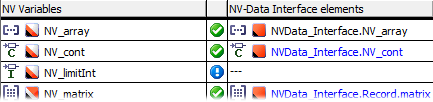
NV Variables column
This column lists all non-volatile variables of scalar, enumeration, array, matrix, or record type from all components directly or indirectly used in the software component.
icon column
This column contains icons that represent the mapping status.
The NV variable is unmapped.
Mapping is okay. The NV variable is mapped to a suitable NVData interface element.
Mapping is invalid, e.g., because the type of the NVData interface element changed after mapping.
NV-Data Interface elements column
This column shows NVData interface elements mapped to the NV variables in the NV Variables column of the Mapped field.
If no mapping exists (–––), the NV-Data Interface elements column can be used to perform mapping. A double-click in a table cell opens a list of all suitable NVData interface elements.
Unsaved changed mappings are indicated by
blue font.
The Mapping menu contains the same options as the context menu.
See also