Using Exclusive Areas
- Create an exclusive area.
In the block diagram editor for SWCs, proceed as follows to use an exclusive area:
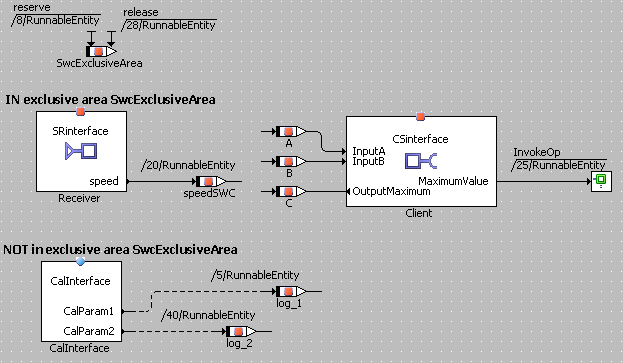
Assign sequence numbers between the numbers of the Reserve and Release methods to all assignments you want to place in the exclusive area.
If, e.g., the runnable RunnableEntity and the numbers 8 and 28 are assigned to an exclusive area, then any sequence calls with numbers 9 – 27 and RunnableEntity are placed in the exclusive area.
 Example
- If desired, make sure that the return value of the access operation is written to a temporary variable.
In the ESDL editor for SWCs, proceed as follows to use an exclusive area:
Enter the code you want to place in the exclusive area between the following lines:
<resource_name>.reserve();
... // your code inside the exclusive area
<resource_name>.reserve();
See also
The following links apply only to the block diagram editor for software components: