Control Flow Operators

Note

Only available in the block diagram editor for software components.

The following control-flow operators are available:

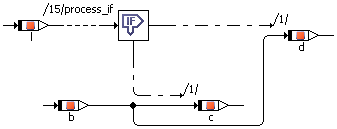
The If…Then statement evaluates a logical expression and activates a control flow branch if the result is True.

ClosedDetails

The control flow output is connected to one or more sequence calls which are triggered whenever the control flow branch is activated. Whenever the input expression evaluates to True, the connected sequence calls are executed.

The example above is equivalent to

if (l) {

c = b

};

As for the if…else statement in ESDL, the generated code is optimized when the expression for If…Then is always true. If…Else (ESDL) describes how the optimization works.

If…Then…Else is similar to If…Then, but has two control flow branches. Depending on the value of the logical expression, the left or right branch is executed, the right branch is executed if the value is True, the left one if it is False.

ClosedDetails

The example above is equivalent to

if (l) {

   d = b}

else {

   c = b

};

As for the If…Else statement in ESDL, the generated code is optimized when the expression for If…Then…Else is always true. If…Else (ESDL) describes how the optimization works.

The only loop construct available in block diagrams is the While loop. Care has to be taken to avoid infinite loops or loops unsuitable for real-time applications.

ClosedDetails

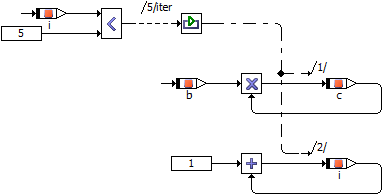
Similarly to the If…Then statement, the control flow is activated when the value of the logical expression is True. The operation is executed as long as the value of the logical input remains True. Therefore, the value of the logical expression should be manipulated in the while loop.

In order to avoid infinite loops, the maximal number of loop iterations can be limited to a fixed number in the project properties, Experiment Code node, of the associated project (or default project).

The example above is equivalent to

while (i<5) {

      c = b * c;

      i = 1 + i;

};

The Switch construct is similar to the Case operator. A Switch evaluates a signed discrete or unsigned discrete value and, depending on that value, activates different control flow branches. These branches are separated from each other, so that a “fall through” like in the switch construct in C is not possible.

ClosedDetails

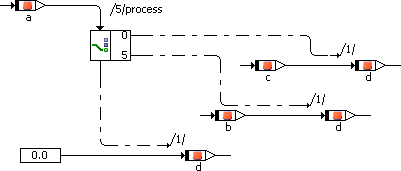
For each alternative the value for the branch can be defined by the user. The last branch at the bottom is the default branch that is executed if the input value does not equal any of the values at the branches.

The example above is equivalent to

switch (a) {

     case 0: {

          break; }

     case 5: {

          d = b;

          break; }

     default: {

          d = 0;

          break; }

}

The break operator in the software component editor behaves similar to a C language return statement.

In a method, the break operator causes an immediate return from the method. The user is responsible for the correct setting of any return values before the break operator is executed.

In a process, the break operator causes a deferred exit. Deferred exit means that all send messages are sent before the exit occurs.

Note

The break operator in the software component editor behaves differently from the break statement in ESDL.

See also

Using the If Statements

Using the While Loop

Using the Switch Operator

Arithmetic Operators

Logical Operators

Comparison Operators

Input Operators

Negation Operator

Conditional Operators

Miscellaneous Basic Blocks

Project Editor – Experiment Code Node