User-Defined System Constants
In some cases, resolving all system constants at the same time is insufficient. Therefore, ASCET provides the possibility to create user-defined subkinds of system constants, each with its own configurable resolution time.
For each user-defined subkind of system constants, the following information must be provided in the form of an ASCET options set:
- a unique identifier
- a unique label that is used throughout the ASCET user interface for the subkind of system constants
- an optional overlay icon for elements to indicate the subkind of system constants
- a possibility to select the resolution time for the subkind of system constants
A sample file for a user-defined subkind of system constants is shown in Example: User-Defined System Constants File. For more information, see Creating and Using User-Defined System Constants.
The option sets for user-defined subkinds of system constants appear as subnodes of the "Modeling\User-defined System Constants" node in the ASCET options window.
The following rules apply to the creation of user-defined subkinds of system constants:
- If a subkind uses an existing element kind as label, and the spelling is identical, the subkind is ignored.
- If a subkind uses an existing element kind as label, and the capitalization is different (e.g., constant instead of Constant), it appears in ASCET.
- If two subkinds have identical identifiers, only the first appears in ASCET. The other one is ignored.
- If two subkinds have different identifiers, but identical labels, both appear in ASCET. The second one adds an extension _<i> (<i> being an integer number) to the label.
Keep in mind the following when you are using user-defined system constants:
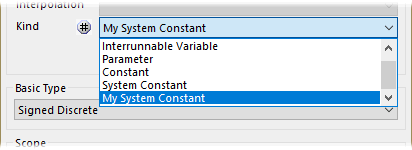
User-defined subkinds of system constants can be selected in the
 "Kind" combo box of the properties editor.
- The resolution time selected for a subkind of system constants overrides the resolution time selected in the target options of your target.
- The resolution time Run Time is not supported for ASCET‑SE targets.
If a subkind of system constants is used in a model, but no definition is available in the ASCET options window, a warning is issued during code generation, and the resolution time selected for your target is used.
WMdl280 – User defined System Constant "<name>" uses missing Kind "<userdef_systemConst_identifier>" – Target Settings are used for resolution time
This warning is promoted to an error by default.
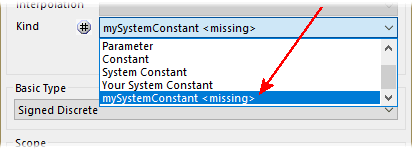
The missing subkind is
shown as %ID% <missing> in the ASCET user interface.- If you export a model with user-defined subkinds of system constants to ASCET V6.4.1 or lower, the kind of the affected elements is set to System Constant.
See also
Example: User-Defined System Constants File
Creating and Using User-Defined System Constants
Constants and System Constants