Creating and Using User-Defined System Constants
Note |
|---|
Keep in mind the rules for the creation of subkinds of system constants. |
A subkind of system constants is defined via a set of four options declared in an *.ascd.xml file; that file must be placed in the Tools\System Constant subdirectory of your ASCET installation. A template *.ascd.xml.template is provided in Tools\System Constant.
- Close ASCET.
- In the Tools\System Constant directory of your ASCET installation, create a copy of the template file *.ascd.xml.template.
Give the copy a unique name and the extension ascd.xml (e.g., mySystemConstant.ascd.xml).
The extension is mandatory for system constant definition files.
Each subkind of system constants needs its own *.ascd.xml file. If you need another subkind of system constants, you have to create another *.ascd.xml file.
An example file is given in Example: User-Defined System Constants File.
- Enter a unique identifier and a unique label for your subkind of system constants.
Proceed as follows to set up your subkind of system constants:
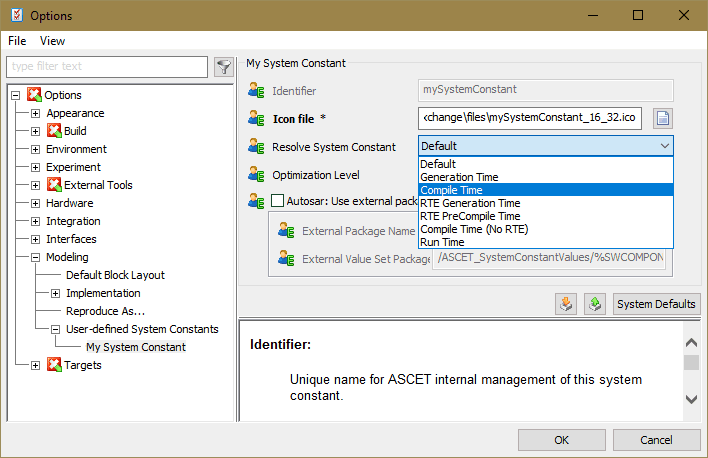
Enter path and name of the image file to be used as overlay for this subkind in the <DefaultValue>... line of the Icon file option.
Note
The image file must be an *.ico file with a 1-bit alpha channel.
Enter the desired resolution time (the
 following values are available) in the <DefaultValue>... line of the Resolve System Constant option.
Enter the desired optimization level (the
following values are available) for this subkind in the <DefaultValue>... line of the Optimization Level option.- If you want to use an external package with system constant definitions, activate Autosar: Use external package with system constant definitions and use External Package Name and External Value Set Package Name to specif the external packages.
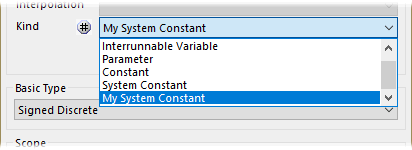
Your subkind of system constants is now available in ASCET. It can be configured in the ASCET options window, Modeling\User-defined System Constants\<subkind> node, and selected in the Kind combo box of an element's properties editor.
Note |
|---|
If you change the configuration of a subkind of system constants, you have to re-start ASCET for the changes to become effective. |
See also
Example: User-Defined System Constants File