
Compile Commands and Compiler Built-ins
Compile Commands
The os command supports the use of the compile_commands.json file.
A compilation database is a JSON file consisting of an array of ‘command objects,’ where each object specifies the directory, command, and file to be compiled.
{
    "directory": "/path/to/project",
    "command": "clang -I/path/to/include -DDEBUG -c source_file.c",
    "file": "source_file.c"
}
RTA‑SQF treats the first token of the command field as the compiler executable path. If that path is relative, it is resolved against the directory field.
Built-in Defines and Include Paths
RTA‑SQF extracts compiler built-in defines and include paths to improve preprocessor accuracy during analysis. The tool will attempt to collect built-in preprocessor directives from the compiler specified in the compilation database and save them to a file named <compiler>.builtins in the output directory.
Behavior summary:
If a
<compiler>.builtinsfile already exists in the output directory (user-provided or previously generated), RTA‑SQF will reuse it instead of regenerating built-ins.If no builtins file exists, the tool will run the detected compiler in a controlled environment to extract built-in defines and system include paths.
The generated builtins file uses clang-compatible syntax (one entry per line:
-Dfor defines,-Ifor include paths).
Identifying the Compiler
RTA‑SQF assumes the first token in the command field identifies the compiler executable. Example entry:
{
    "directory": "/path/to/project",
    "command": "gcc.exe -I/path/to/include -DDEBUG -c source_file.c",
    "file": "source_file.c"
}
In this example, RTA‑SQF uses the gcc.exe as the compiler to extract built-ins.
Builtins File Format and Requirements
When providing a custom builtins file or editing a generated one, follow these rules:
One entry per line.
Use clang-compatible format:
-DNAMEor-DNAME=valuefor defines,-I/pathfor include paths.Do not include additional shell quoting; each line must be a plain compiler argument.
Examples
A minimal builtins file (for clang/gcc-like compilers):
-D__STDC__=1
-D__GNUC__=9
-D__SOMETHING=42
-I/usr/lib/gcc/x86_64-linux-gnu/9/include
-I/usr/include
Supported Compilers
RTA‑SQF can extract built-ins from the following compilers:
WindRiver
GCC
Tricore-gcc (Hightec)
Greenhills
Troubleshooting and Notes
Extraction requires the compiler binary to be runnable on the host machine. If the compiler is not available, provide a builtins file manually.
The extraction process runs the compiler with flags that limit it to preprocessing; however, some compilers or wrappers may still produce interactive prompts or dialogs. In such cases, run extraction in a controlled environment or supply a builtins file.
If generated builtins contain unexpected entries, validate them by passing the file to a clang-based compiler invocation to confirm behavior.
When the compiler executable path is not absolute, ensure that it can be resolved natively through the system PATH.
See Also
Visit JSON Compilation Database Format Specification4 for the expected structure of the compilation database.
Source Code Parsing and Diagnostic Message Evaluation
For every source file referenced in the compilation database, RTA-SQF parses the file to build an Abstract Syntax Tree (AST), which is the basis for all source-code-based analyses. Each code file is parsed independently, so a failure in one file does not prevent the others from being analyzed.
After parsing, RTA-SQF checks the error-level diagnostic messages produced by the parser. Certain diagnostic errors — such as recoverable semantic issues or inline assembly blocks — are known to be compatible with a reliable analysis result and can be filtered out using a custom configuration file.
Note
Diagnostics from included files
Error-level diagnostics from included header files are evaluated and may block the analysis of the including source file unless matched by a filter rule.
Customizing Diagnostic Filtering
To filter specific diagnostic errors, create a file named appsettings.custom.json in the tool’s configuration folder, i.e. the folder specified with the --config option (default: rta-sqf-cfg, relative to --dir or to the working directory if --dir is not provided — see Basic Design of the Command Line Interface).
When appsettings.custom.json is present and contains the CustomClangCompilationOption section, it replaces the default filter rules entirely. The default rules are described in Default Filter Rules.
Each rule in DiagnosticErrorToBeSkipped is an object with the following properties:
Property |
Type |
Description |
|---|---|---|
|
string |
A human-readable name used to identify the rule in log messages. |
|
integer |
The diagnostic category number that the rule targets. A diagnostic is matched only when its category equals this value.
The category number and name for each error are reported in the tool log in the form |
|
regex string |
A .NET regular-expression pattern matched against the diagnostic spelling (short message text). Defaults to |
|
regex string |
A .NET regular-expression pattern matched against the absolute file path where the diagnostic was raised. Defaults to |
A diagnostic is suppressed when all three matching criteria are satisfied simultaneously: CategoryId equals the diagnostic category, Message matches the diagnostic spelling, and FilePath matches the source file path.
Important
Regex validation
Both Message and FilePath must be valid .NET regular expressions.
All filter rules are validated at startup: an invalid pattern causes the tool to terminate immediately with an error, before any source file is analyzed.
How to Identify the Values for a Filter Rule
When a source file is blocked by a diagnostic error, the tool logs an Error line containing all the information needed to write a filter rule.
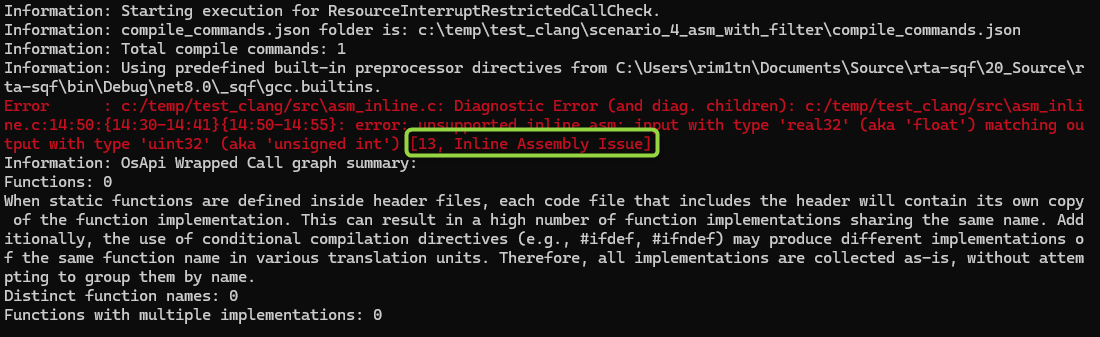
Example of a diagnostic error log line. The Diagnostic Error label confirms the file was not analyzed. The [CategoryId, CategoryName] tag identifies the diagnostic category.
The log line has the following structure:
Error: <file_path>: Diagnostic Error (and diag. children): <file_path>:<location>: error: <message> [<CategoryId>, <CategoryName>]
From this line, extract the values as follows:
``CategoryId`` — the integer at the beginning of the bracketed tag, e.g.
[13, Inline Assembly Issue]→13.``RuleName`` — use the
CategoryNamefrom the same tag as a descriptive name, e.g."Inline Assembly Issue".``Message`` — the error text between
error:and the bracketed tag. Use.*to match any message in that category, or write a more specific pattern to narrow the rule.``FilePath`` — the file path at the beginning of the line. Use a .NET regular expression to match the path.
Important
Safety consideration
Suppressing a diagnostic category instructs the tool to continue the analysis even when the parser reports an error. Only suppress categories for which you have verified that the error does not affect the correctness of the analysis results.
Default Filter Rules
The tool ships with two pre-configured filter rules for diagnostic categories that are known to be compatible with a reliable analysis result:
Category 2 — Semantic Issue: semantic errors that the parser can recover from while still producing a usable result (e.g., a void function returning a value, or use of an undeclared identifier, where the surrounding call structure remains intact).
Category 13 — Inline Assembly Issue: errors raised when a source file contains inline assembly blocks; these errors do not affect the validity of the surrounding C/C++ call structure.
These rules are defined in ClangCompile.config.json. RTA-SQF is distributed as a single-file executable, so this file is bundled inside the executable and extracted to a temporary directory at startup. The extraction path depends on the platform and on whether the DOTNET_BUNDLE_EXTRACT_BASE_DIR environment variable is set:
Condition |
Extraction path |
|---|---|
|
A subdirectory under the path specified by the variable. |
Linux or macOS (variable not set) |
A subdirectory under |
Windows (variable not set) |
A subdirectory under |
Important
Do not modify ClangCompile.config.json
The file is extracted from the tool bundle at startup and overwritten each time the tool is updated. Any manual change would be silently lost on the next update and would not be traceable in version control — a critical requirement for safety-relevant validation projects.
Use appsettings.custom.json to define project-specific filter rules: this file belongs to the project, can be version-controlled, and is not affected by tool updates.