Parameters for ES930: Events Tab
In this tab you can configure event rasters based on digital input signals: a measured value is transmitted only when a specific event has occurred on a digital input. Such an event, e.g., an active-inactive signal edge, triggers the synchronous measurement of all inputs coupled to this event. In a rapid prototyping use case, these event triggered input signals facilitate the synchronization of the model sequencing to external events.
You can define up to four event sources in the ES930 module, each resulting in an event raster.
The event raster can be used for all input signals of the ES930. As soon as an event raster is defined, this event raster is automatically added to the list of selectable rasters for the input signals. The event raster is always applied inside of one ES930.
Each event raster is triggered by only one digital input channel.
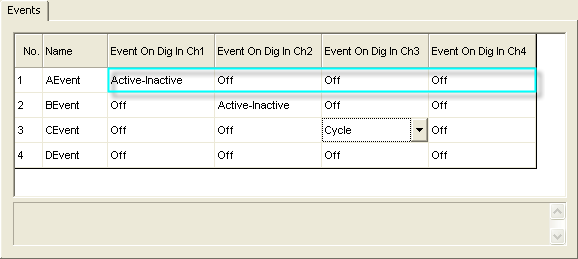
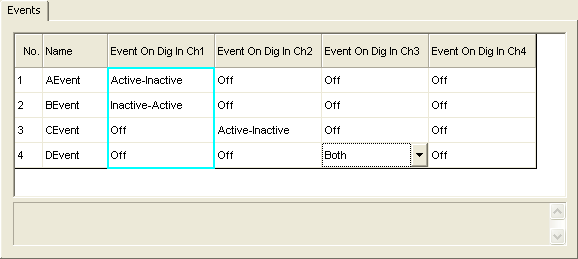
However, the same digital input channel can be used to trigger different event rasters.
To go to the Events tab, click the item for the ES930 system in the Topology list.
The following list shows the parameters in the Events tab of the ES930:
 Events tabNo.
Shows a consecutive number for each entry in the hardware configuration table.
You cannot edit this field.
NameShows the name of the event raster.
You cannot edit this field.
Event On Dig In Ch[n]In the Events tab, there is one separate column for each digital input channel as signal source for an event raster. For each digital input channel, select the type of signal edges on which each event is generated:
Off
This event raster is not triggered by this digital input channel.
Active-Inactive
The event raster is triggered on each active-inactive edge of the digital input channel.
Inactive-Active
The event raster is triggered on each inactive-active edge of the digital input channel.
Both
The event raster is triggered on each active-inactive and on each inactive-active edge of the digital input channel.
Cycle
The event raster is triggered at the end of each cycle on this digital input channel.
Digital input hardware-specific settings like active state, number of periods per cycle, or starting edge of a period / cycle, are defined in the Parameters for ES930: Digital In Tab.
See also