ES1xx
The members of the ES1xx family are interface modules and media converters.
The ETAS ES132 interface module is a CAN/CAN FD to Ethernet interface.
The media converters convert Automotive Ethernet into Standard Ethernet (IEEE 802.3). The connection speed and connection mode of the Automotive Ethernet can be configured via a web interface.
To connect to the web interface, in the HWC window, right-click on the device icon. To configure the device, select Configure...
Module Descriptions
 ES132 Interface Module
The ES132 interface module can be connected to the CAN bus of a vehicle or an ECU. With the ES132 Lemo interface you can connect to the following ETAS devices: ES52x, ES59x, ES600.2, ES88x, or ES89x.
Interfaces:
- Two CAN / CAN FD interfaces
- One combined connection for power supply and 10/100 BASE-T Ethernet (IEEE 802.3) via the connected ETAS module, for example ES5xx and ES8x modules>
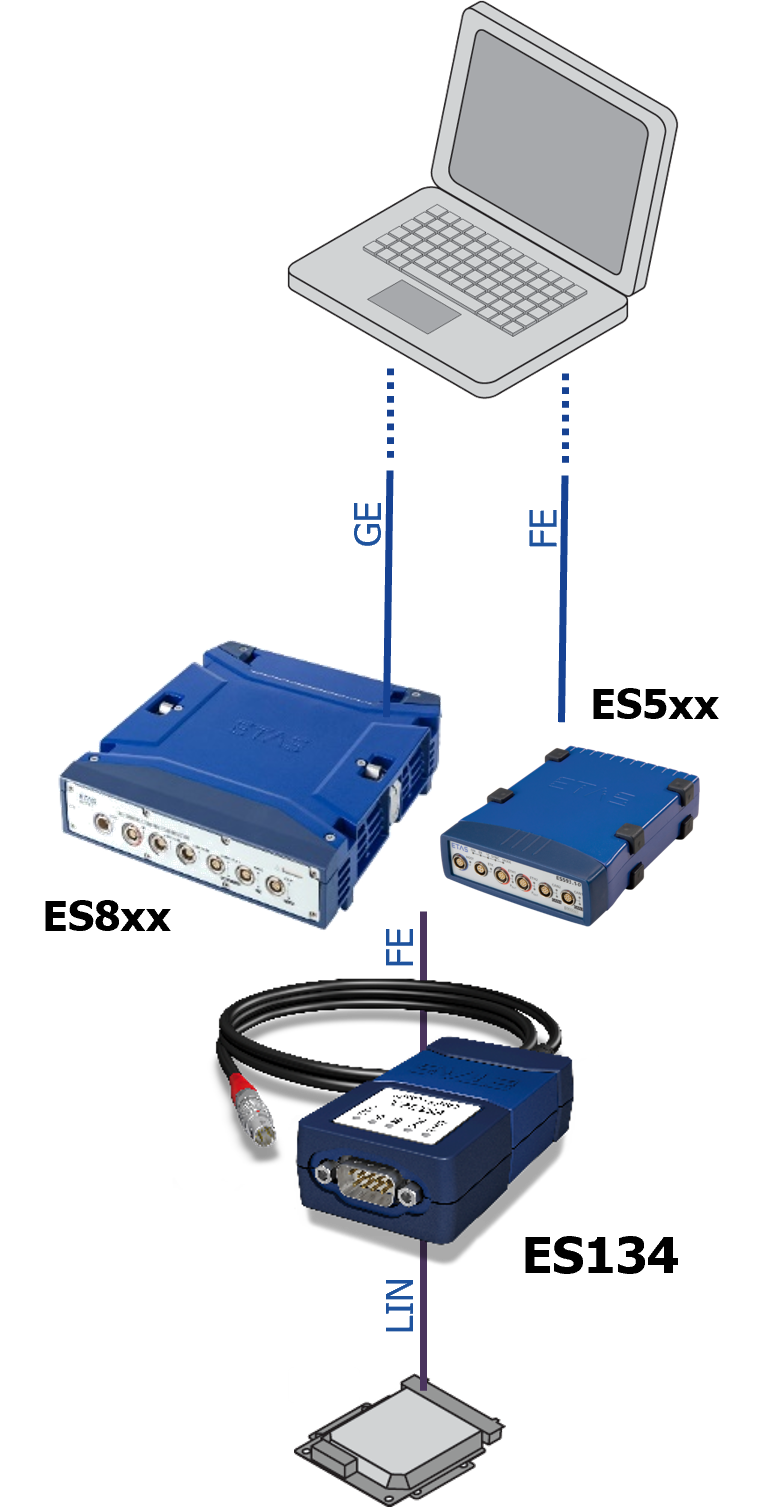
ES134 Interface Extension ModuleThe ES134 interface module can be connected to the LIN bus of a vehicle or an ECU. With the ES134 Lemo interface you can connect to the following ETAS devices: ES8xx, ES5xx, or ES600.2.
Interfaces:
- Two LIN interfaces
- One combined connection for power supply and 10/100 BASE-T Ethernet (IEEE 802.3) via connected ETAS module
Supports baud rates up to 20 kbit/sec
Supports ETAS time synchronization mechanism
Supports the ETAS wake up – sleep mechanism
Hardware Setup
ES160 Media ConverterThe Media Converter ES160 can be connected directly to a PC with a RJ45 network interface.
Interfaces:
- One 100/1000BASE-T1 Automotive Ethernet
- One power supply
- One 100/1000BASE-T Ethernet (IEEE 802.3) connection to the PC
ES161 Media ConverterThe Media Converter ES161 can be connected directly to a PC with a RJ45 network interface.
The ES161 can also be used to cascade several ES570 devices to combine more Automotive Ethernet channels of these devices.
Interfaces:
- One 100/1000BASE-T1 Automotive Ethernet
- One power supply
- One 100/1000BASE-T Ethernet (IEEE 802.3) connection to the PC
Cascading use case
100/1000BASE-T1 Automotive Ethernet interface: connection to PC
ES162 Media ConverterThe Media Converter ES162.1 can be connected to modules with Lemo Gigabit-Ethernet connection and integrated power supply, e.g. ES8xx.
Interfaces:
- One 100/1000BASE-T1 Automotive Ethernet
- One combined connection for power supply and 100/1000BASE-T Ethernet (IEEE 802.3) via connected ETAS module (e.g. ES8xx)
ES165 Media ConverterThe Media Converter ES165.1 can be connected to modules with Lemo-Fast-Ethernet connection and integrated power supply, e.g. ES8xx, ES5xx, ES600.2.
Interfaces:
- One 100/1000BASE-T1 Automotive Ethernet
- One combined connection for power supply and 10/100BASE-T Ethernet (IEEE 802.3) via connected ETAS module (e.g. ES5xx, ES8xx)
ES166 Media ConverterThe device is a pure Ethernet device with one 10BASE-T1S channel.
The Media Converter ES166.1 can be connected to modules with Lemo-Fast-Ethernet connection and integrated power supply, e.g. ES8xx, ES5xx, ES600.2.
Interfaces:
- One 10BASE-T1S Automotive Ethernet
- One combined connection for power supply and 10/100BASE-T Ethernet (IEEE 802.3) via connected ETAS module (e.g. ES5xx, ES8xx)
Module Parameters
Regardless of which interface you use, you have to set global parameters. These settings then apply to all integrated interfaces.
Parameters tabNameEnter any name for the system.
Serial numberShows the serial number read from the device.
If the hardware is not connected or if it was not found during the hardware search, enter the complete number by hand (it can be found on the device).
The serial number must be entered as it is needed by INCA to identify the device. The serial number is stored in the hardware configuration.
Alias nameEnter an internal name of the device. It is stored in the device like the serial number and helps you to distinguish between devices of the same type. By assigning a unique name which expresses the role of the device, it can be used more conveniently than the serial number, especially when you link the devices in the Hardware Mapping dialog box. The alias name is used, for example, if you switch between different vehicles when measuring with the laptop or if you have installed different devices of the same type in the vehicle.
Firmware versionShows the firmware version of the connected hardware module.
INCA hardware communicationShows the hardware connection between the hardware and the PC.
You cannot edit this field.
For the ES166, there are two additional parameters:
IP AddressIP address of the module in the network. To access the WEB interface of the module, double-click on the IP address.
VariantDisplays the variant of the actually connected device.
Application options
Working in the Hardware Configuration Editor