Calibration Window
A calibration window can be displayed in different ways.
The following display options for calibration variables in a calibration window are available:
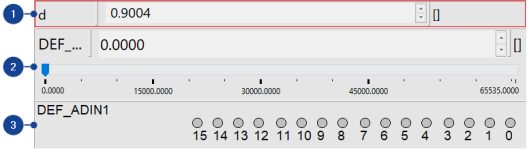
Numeric display
Displays data numerically. The data cannot be edited but only selected from the set of permissible values.
Slider display
Displays data as values on a slider. You can change the data by moving the slider.
Bit display
Displays data as bit values.
Note |
Once you have created the dataset by importing a data exchange file, the dataset can contain variables with fill bytes. Variables containing fill bytes are represented in gray. |
See also