Measure Window
A measure window can be displayed in different ways.
The following display options for measure variables in a measure window are available:
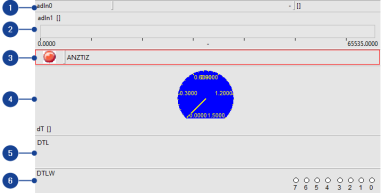
Numeric display
Displays measure values numerically. It is particularly useful for displaying measure variables that change only slowly.
Bar display
Shows measure values as colored bars. The measure value is also shown numerically under the bar.
Alarm display
For monitoring measure channel status. Fulfillment or non-fulfillment of alarm conditions is shown by corresponding symbols.
Gauge display
Displays measure values as a hand on a round scale. The operating limit is shown by a second, fixed hand.
Dialog display
Displays messages on the user-defined sub-areas of a measure channel.
Bit display
Displays measure values as bit values. It is particularly useful for displaying binary measure variables.
To change the display of the measure window, see Setting Measure Channel Display in Measure Window.
See also