User Options for E-Target
To go to this tab, click the User Options button and select the E-Target
tab.
button and select the E-Target
tab.
You can make the following settings for the E-Target:
Activate download warning
The E-Target must be stopped when a dataset is downloaded to the device.
Since stopping and restarting the E-Target is done automatically this action is not visible to the user.
Yes
INCA informs you about stopping and restarting the E-Target before downloading a dataset to the device.
No
INCA executes the download without any further information that this requires stopping and restarting the E-Target.
Meas. failure behavior
Specifies the default settings for the system's reaction if the connection between INCA and the hardware module is interrupted during measurement.
Abort after failure
The measurement using this hardware module will be terminated in any case of measurement failure (at measuring start or during measurement). The system does not try to reinitialize the hardware module. After the connection has been interrupted, you have to reinitialize manually.
This option is appropriate when, e.g., the measured values are not essential for the experiment, as the module will be ignored after any failure. This option is the default.
Abort at start, try again later
INCA stops measurement of this module in case of failure at measuring start, assuming the module is disconnected or has any systematic problem.
It continues to try measurement in case of failure during the measurement assuming the failure is temporal and can be resolved via retries.
Retry always
INCA continues to try measurement of this module in any case of measurement failure (at measuring start or during measurement).
This option is useful if you want to conduct quick start or cold start measurements.
Start after Initialization
Specifies whether by default the program should start automatically right after the hardware has been initialized. This option is only available if no program version is stored in the flash memory.
Yes
The program is started automatically right after the hardware has been initialized.
No
The program is to be manually started later on from the experiment environment.
Deactivate this and the next option if you want to resume a connection to a running experiment that was previously interrupted, in order to prevent the experiment from being reset after the connection has been established.
Automatic Upload to Dataset
Determines whether by default the automatically generated empty initial dataset in the INCA database will be overwritten with the code file’s initial values.
Yes
The values of the code file will be written into the INCA data upon starting the experiment for the first time.
No
The INCA data version is not automatically overwritten.
Automatic freeze after flashing WP
Specifies whether INCA performs an automatic dataset freeze after you flash the working page or not.
Yes
INCA performs an automatic dataset freeze after you flash the working page. That means, that INCA uses the current working page as new reference page and creates a copy to be used as working page dataset. After flashing, the checksums on the reference page between INCA and the E-Target are equal.
No
The datasets will be the same as before. After flashing, the checksums on the reference page usually differ between INCA and the E-Target.
Memory Page Comparison Method
Determines whether the memory page comparison method of the datasets is regular or fast.
Regular
The regular memory page comparison method counts the byte difference for working page and reference page datasets.
In the Experiment Environment Device Information bar, the differences are displayed as follows:
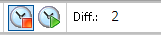
Diff.: 0
Indicates equal datasets.
Diff.: <n>
Any other number indicates the corresponding byte difference of the datasets.
Fast
The fast memory page comparison method only checks the memory page equality of the working page and reference page checksum. Use this option for very large datasets. After each calibration, the Experiment Environment Device Information list is updated faster.
In the Experiment Environment Device Information bar, the differences are displayed as follows:
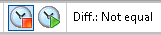
Diff.: Equal
Indicates available checksum and equal datasets.
Diff.: Not equal
Indicates available checksum and that the datasets are not equal.
Diff.: Unknown
Indicates that there is no checksum before hardware initialization, no reference page or no confirmed calibration.
Further INCA user options relevant for INCA-EIP
Enable Measurement of Calibrations
See also