Settings for Data Exchange - Maximum Precision
The following are detailed information using the user option Maximum Precision.
In a transfer file, the values are represented as a string with physical values. The information of the original data type used in the software implementation is no longer available. The physical format is used to be independent of implementation type. It is important to support a precision that allows you to convert the physical values back to an implementation type without losing information. The easiest way would be to use the highest available precision, but on the other hand the precision should be minimal to avoid huge transfer files and allow an easy representation in documentation. To support different use cases, the precision must be adjustable. The INCA Calibration Data Manager allows you to select different precision calculation methods ('Precision' option) dependent on the use case.
Option = 'from ASAM-2MC file'
The precision 'from ASAM-2MC file' uses the format definition of the COMPU_METHOD in the A2L file. The format is given as '%[length].[layout]' where length specifies the overall length, layout specifies the number of decimals. E.g.: '%8.3' will result in a 'xxxxx.yyy' representation.
Hint:
- All 'y' are written even if they are '0'. For 'x', leading '0' are suppressed.
- ASAP2 allows to overwrite the FORMAT definition in the COMPU_METHOD with the optional FORMAT definition in the CHARACTERISTIC itself.
- A dataset with A2L description must be available as source. For a file-based source, the precision of float32 (9 decimals) is used.
- If the A2L format is not exact enough, information is lost.
If the data exchange file in the CDM is not linked with the corresponding project file (*.a2l), not all the required information is available. In this case, the accuracy of the values is determined with which the values are listed in the data exchange file; trailing zeros are taken into account. The CDM stores the calculated accuracy and uses it for additional operations (compare, list); any subsequent changes of the accuracy are not taken into account.
Option = 'by data type'
The precision 'by data type' uses the type definition of the label in the A2L file.
Type | Precision (standard formula) | Precision (hyperbolic formula) |
boolean | 4 decimals | 6 decimals |
byte | 4 decimals | 6 decimals |
word | 7 decimals | 11 decimals |
long | 12 decimals | 18 decimals |
float32 | 9 decimals | 14 decimals |
float64 | 9 decimals | 14 decimals |
float80 | 12 decimals | 18 decimals |
unknown | 7 decimals | 9 decimals |
Hint:
- A dataset with A2L description must be available as source.
- For a file-based source, INCA uses the precision of float64 (16 decimals).
If the data exchange file in the CDM is not linked with the corresponding project file (*.a2l), not all the required information is available. In this case, the accuracy of the values is determined as described under Option = 'maximum precision'.
Option = 'calculate automatically'
The precision 'calculate automatically' uses the type definition of the label and the COMPU_METHOD of the A2L file.
The calculation is done by decreasing (x-1) and increasing (x+1) the original implementation value (x) by one digit and calculating the corresponding physical values (p). The physical differences d+1 = p+1 - p0 and d-1 = p0 - p-1 are calculated.
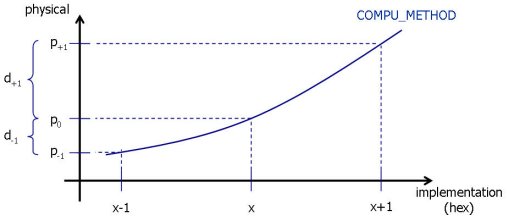
Precision calculated automatically
The smaller difference is used to determine the needed precision. If the difference is 'x.yyyy e-n', the number of needed decimals is n.
Hint:
- A dataset with A2L description must be available as source.
- For a file-based source, INCA uses the precision of float64 (16 decimals).
- Axis and values are calculated separately.
In principle the calculation for file and dataset is identical.
- +-1 impl (for file: double epsilon), formula is ident -> 15 digits
- For the number of significant digits, the current value is used.
- For Float, INCA checks for unnecessary zeros at the end and deletes them.
- On curves or maps, CDM searches for the values that need the most decimals and uses this number for the complete map.
If the data exchange file in the CDM is not linked with the corresponding project file (*.a2l), not all the required information is available. In this case, the accuracy of the values is determined with which the values are listed in the data exchange file; trailing zeros are taken into account. The CDM stores the calculated accuracy and uses it for additional operations (compare, list); any subsequent changes of the accuracy are not taken into account.
Option = 'maximum precision'
The precision 'maximum precision' option always uses the maximum precision.
INCA uses float64 with 16 decimals.
Option = 'calculate minimum difference / calculate automatically'
For a compare action, the precision 'calculate minimum difference / calculate automatically' option uses the difference between source and destination additionally to the 'calculate automatically' option. For listing the difference at multiple axis points is used.
Comparing
If the difference between the source and the destination dds = pd0- ps0 is smaller than the differences calculated with the 'calculate automatically' option dds is used to determine the precision.
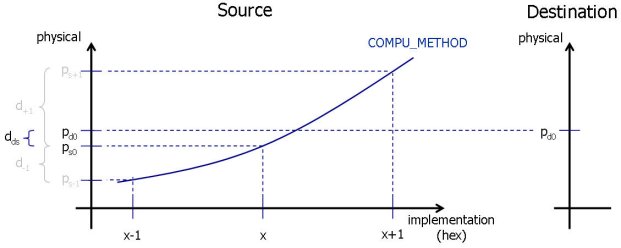
Precision calculated automatically / minimum difference for compare
If dds = 0, the precision is calculated identically to 'calculate automatically'.
Hint:
- A dataset with A2L description must be available as source. For a file-based source, INCA uses the precision of float64 (16 decimals).
Display
For curves and maps (not scalars) additionally the differences dz+1 = z+1 - z0 and dz-1 = z0 - z-1 are calculated.
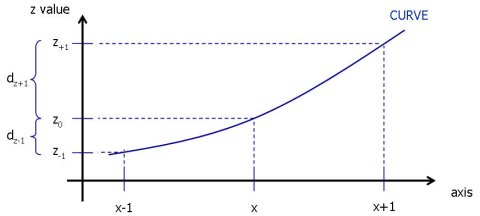
Precision calculated automatically / minimum difference for listing
If one of this differences is smaller as the result of the 'calculate automatically', it is used to determine the precision.
If the data exchange file in the CDM is not linked with the corresponding project file (*.a2l), not all the required information is available. In this case, the accuracy of the values is determined with which the values are listed in the data exchange file; trailing zeros are taken into account. The CDM stores the calculated accuracy and uses it for additional operations (compare, list); any subsequent changes of the accuracy are not taken into account.
See also