Data Logging Configuration
The "Data Logging Configuration" (ODX>Data Logging Configuration) is used to determine how snapshot data is saved. For more details on the snapshot function, refer to the sections User Views and Snapshots.
Note |
|---|
Please note that only the data of user views configured accordingly are recorded in the snapshots. The snapshot icon at the extreme left of the title bar of the user views indicates whether the data of the relevant user view is recorded in the snapshot. |
The settings which you specified can be exported to a file to be used later. Settings exported previously can be reimported from files exported previously.
The "DataLoggingConfig" window contains two tabs:
File
settings on file name and storage location of the snapshot
Header
meta information added to the snapshot data
To configure Data Logging
- Select ODX>Data Logging>Configuration.
- Set the configuration to correspond to your requirements. The following sections explain the significance of the input fields and options.
- Click OK.
"File" Tab
This is where you specify in which directory and with which file name the snapshot data is to be saved.
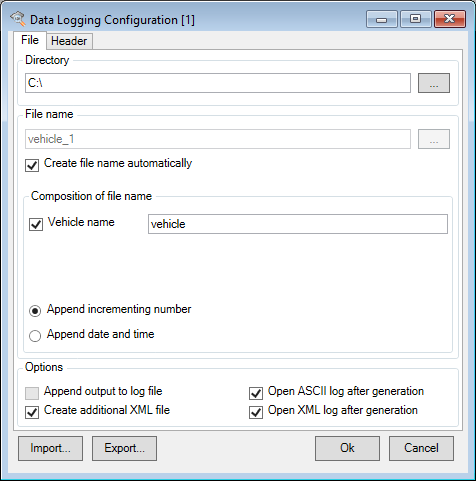
Input Field or Option | Meaning |
|---|---|
Directory in which the snapshot files are saved | |
File name for the snapshot files. If you activated the option "Create file name automatically", you cannot enter a file name here. | |
The file name is created automatically | |
This is where you specify the individual parts and composition of the file name | |
Activate this option to include the vehicle name from the input field in the file name created automatically. | |
An automatically incrementing number is added to the file name. | |
The current date and the current time (format: "yyyymmdd_hhmmss") are added to the file name | |
The snapshot data is appended to the existing data in the log file. This option is only available when the file name is generated manually. | |
The snapshot file is opened automatically | |
An additional XML file is created with the snapshot data | |
The XML file is opened automatically as HTML in your standard browser. |
"Header" Tab
This is where you specify which meta information should be added to the snapshot data.
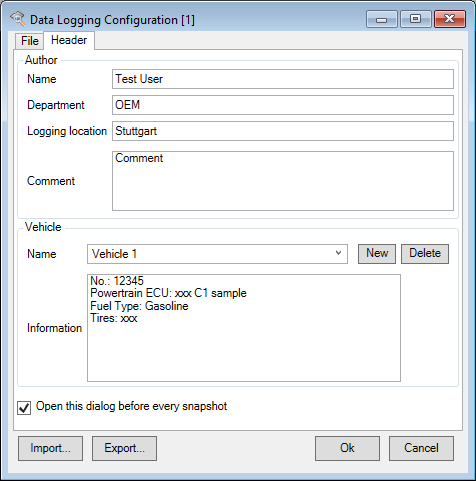
Input Field or Option | Meaning |
|---|---|
Your name | |
Your department within your company | |
The location of the recorded data | |
Notes on data recording | |
List with vehicle names | |
Name of vehicle | |
Notes on vehicle | |
Open this dialog before every snapshot | Activate this option to open this dialog box before the snapshot data is saved to adapt the meta information for the snapshot. |
Exporting and Importing Configurations
All configuration data can be exported as XML files and then imported again. Proceed as follows:
To export Data Logging Configuration
- Select ODX>Data Logging Configuration....
- The "DataLoggingConfig" window opens.
Click Export....
A file selector window opens.
- Enter the required file name and click Save.
To import Data Logging Configuration
- Select ODX>Data Logging Configuration....
- The "DataLoggingConfig" window opens.
Click Import....
A file selector window opens.
- Enter the name of the file to be imported and click Open.