 Step 1: Creating a New Database, Folder, Workspace, and Experiment
Step 2:
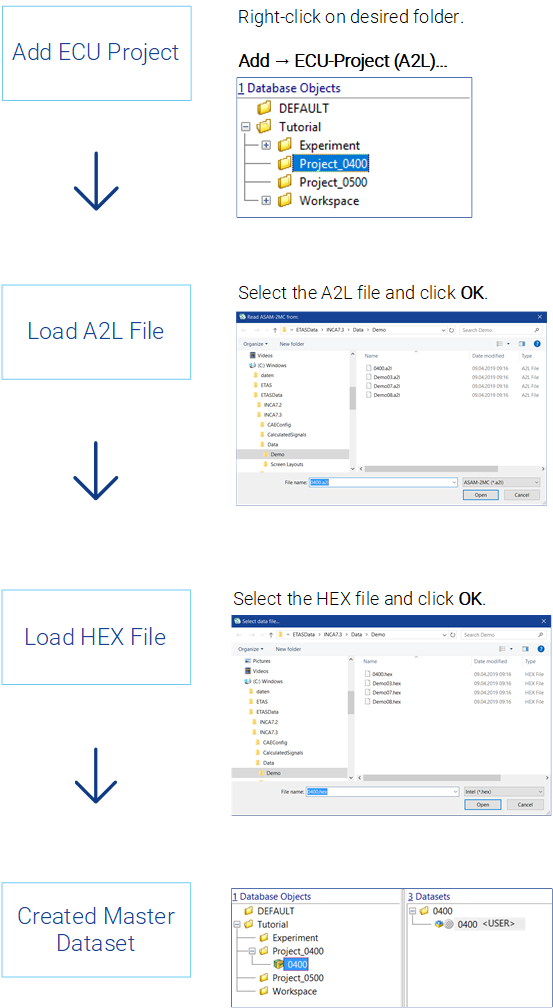
Prerequisites for calibrating with INCA are creating a memory image of the control unit and storing the information in the form of datasets in INCA.
Before you can use INCA to apply different projects, you need the following files:
- Project description file (*.a2l) with the physical description of the data
- HEX file (Intel Hex or Motorola format, e.g.: *.hex or *.s19) containing the ECU program, which consists of code and data
- (Optional) control device documentation if the control device manufacturer provides such documentation
The different data statuses of working and reference
pages are stored separately in INCA as a working dataset and a read-only
reference dataset. Read-only datasets are shown with a red frame  .
.
When loading the first HEX file, the code portion is mapped to the control unit project (transparent to the user). The data portion of this HEX file is stored as the so-called "Master" dataset. The master dataset is then used to also create the required working dataset.
Step 3: Setting Up the Workspace
See also