ASAM MCD 2MC Editor Window
The title bar of the window specifies the open project and the project file.
The window contains the following components:
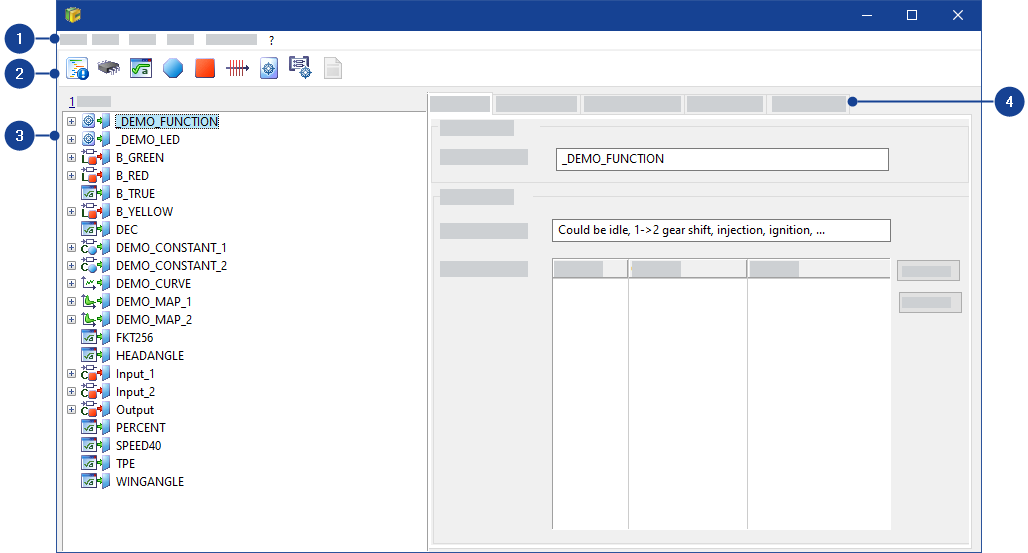
 1 Menubar
The window contains the following menus:
File menuThis menu contains the following functions:
Undo
Undoes the last changes step by step (except changes on the Values tab).
Redo
Redoes undone changes step by step (except changes on the Values tab).
Cancel
Closes the ASAM MCD 2MC Editor window.
All unsaved changes are discarded.
Close
Closes the ASAM MCD 2MC Editor window.
Values you have changed in the project file (and in any working dataset you may have opened) are saved.
Calibration Log
Logs all calibration actions.
Write | Writes a list of all calibration actions to a log file. |
Add Comment | Adds a comment to the application log. |
Edit menuNote |
You can make these settings for calibration variables on the Values tab only. |
This menu contains the following functions:
Undo last change
Undoes the last changes step by step.
Redo last change
Redoes undone changes step by step.
Copy
Copies the marked values to the clipboard.
Paste
Pastes values from the clipboard.
Copy all data to clipboard
Copies all values to the clipboard. They can then be transferred to another program (e.g., Microsoft Excel).
Select all values
Selects all values.
Check bounds
Checks the weak bounds. If the bounds are exceeded, the value is shown red.
Decrement
Reduces the selected values by one unit of the underlying step width.
Increment
Increases the selected values by one unit of the underlying step width.
Add offset
Opens the Add offset dialog box in which you can enter an offset to be added to the selected values.
Multiply by
Opens the Multiply by factor dialog box in which you can enter a factor for multiplying the selected values.
Divide by
Opens the Divide by dialog box in which you can enter a divisor by which the selected values are divided.
Fill with value
Opens the Fill with value dialog box in which you can enter a new value for the selected values.
Axis
Contains menu functions for editing the axis points of table values:
X-Axis Breakpoints Setup | Opens a dialog box in which you can enter the start value and interval of the axis point. |
Decrement x-axis point | Reduces the value of the selected axis point by one unit of the underlying step width. |
Increment x-axis point | Increases the value of the selected axis point by one unit of the underlying step width. |
Edit x-axis point | Opens a dialog box in which you can edit the value of the selected axis point. |
Add x-axis point | Opens a dialog box in which you can add a new axis point. |
Remove X Axis Point | Removes the selected axis point. |
Y-Axis Breakpoints Setup | Opens a dialog box in which you can enter the start value and interval of the axis point. |
Decrement y-axis point | Reduces the value of the selected axis point by one unit of the underlying step width. |
Increment y-axis point | Increases the value of the selected axis point by one unit of the underlying step width. |
Edit y-axis point | Opens a dialog box in which you can edit the value of the selected axis point. |
Add y-axis point | Opens a dialog box in which you can add a new axis point. |
Remove Y Axis Point | Removes the selected axis point. |
View menuNote |
You can make these settings for calibration variables on the Values tab only. |
This menu contains the following functions:
Display units
Toggles display of measure units. The measure unit must exist in the A2L file.
Reset Change Marks
Resets the change marks of all changed values.
Autofit columns
Optimizes the column widths in value tables.
Autom. optimum size
Defines whether values are to be adapted for the display.
Optimal Size
Sets optimum values for the display.
Extras
Contains menu functions for displaying calibration variables:
Display setup | Opens a dialog box in which you can set the number of decimal places for values and axis points, the step width and the column width. |
Display addresses | Toggles display of memory addresses of the values. |
Physical representation | Displays values and axis points physically. |
Hexadec. representation | Displays the internal memory value of values and axis points hexadecimally. |
Bin representation | Displays the internal memory value of values and axis points in binary format. |
Decimal representation | Displays the internal memory value of values and axis points decimally. |
About variable | Opens a dialog box showing a view of all details of the calibration variable. |
Item menuThis menu contains the following functions:
Delete
Deletes the element marked in the Items list.
Copy
Copies the element marked in the Items list.
New
Creates a new element in the Items list.
Search
Searches the Items list for the name of an element.
About variable
Opens a dialog box showing an overview of all details about the variable.
Show the Variable Documentation
Note |
The ECU documentation is displayed only if the ECU manufacturer has provided it and it has been added to the project in the database manager. |
Displays the ECU documentation of the variable highlighted in the Items list.
Max Bounds
Sets the lower and upper limits to the maximum possible size.
Selection menuThis menu contains the following functions:
Mod Par
Displays module parameters only.
Memory Segments
Displays memory segments only.
Conversion Method
Displays conversion method only.
Adjustable Objects
Displays calibration variables only.
Measurements
Displays measurement variables only.
Axis Points
Displays defined axis points only.
Functions
Displays functions only.
Groups
Displays groups only.
All Named
Displays all elements only.
? menuThis menu contains the following functions:
Hotkey Assignment
Opens the Hotkey Assignment for Editor dialog box in which can see the hotkey assignment for the ASAM MCD 2MC Editor.
Help
Opens the INCA help.
Info
Opens an information box about the ASAM MCD 2MC Editor.
2 ToolbarThe toolbar contains the following icons:
| Displays module parameters only. |
| Displays memory segments only. |
| Displays conversion methods only. |
| Displays calibration variables only. |
| Displays measurement variables only. |
| Displays defined axis points only. |
| Displays functions only. |
| Displays groups only. |
| Displays all elements. |


 3 Items List
The items list shows all elements contained in the A2L file. Use the toolbar to filter for specific items.
4 TabsLists all elements of the project file or, if a filter is selected, elements of the selected type.
The window contains some of the following tabs, depending on the item marked in the Items list:
Tabs for measurement variables:
Base Data tabThis tab contains the following fields:
Required Data
Contains the most important data for the element marked in the Items list.
Element name | ASAM MCD 2MC keyword: MEASUREMENT Name |
Address | ASAM MCD 2MC keywords: ECU_ADDRESS and IF_DATA If an IF_DATA section is specified, you cannot edit the address. |
Default Data
Contains general data for the element marked in the Items list.
Long name | ASAM MCD 2MC keyword: MEASUREMENT LongIdentifier |
Display Identifier | ASAM MCD 2MC keyword: DISPLAY_IDENTIFIER |
Conversion | ASAM MCD 2MC keyword: MEASUREMENT Conversion |
Data Type | ASAM MCD 2MC keyword: MEASUREMENT Datatype |
Weak Bounds: Lower | ASAM MCD 2MC keyword: MEASUREMENT LowerLimit |
Weak Bounds: Upper | ASAM MCD 2MC keyword: MEASUREMENT UpperLimit |
Optional Data tabThis tab contains the following fields:
Data
Contains additional data for the element marked in the Items list.
Format string | ASAM MCD 2MC keyword: FORMAT If FORMAT is missing, the FORMAT specification of the respective specification COMPU_METHOD (in MEASUREMENT Conversion) is displayed. | ||||||||||||||||||
Byte order | ASAM MCD 2MC keyword: BYTE_ORDER If BYTE_ORDER is missing, Default is displayed. The default byte sequence is defined in the A2L file in the MOD_PAR area. BYTE_ORDER is not supported by INCA for measurement variables. | ||||||||||||||||||
Max. Refresh: Rate | ASAM MCD 2MC keyword: MAX_REFRESH Rate | ||||||||||||||||||
Max. Refresh: Unit | ASAM MCD 2MC keyword: MAX_REFRESH ScalingUnit | ||||||||||||||||||
Access | ASAM MCD 2MC keyword: READ_WRITE Permits write access to measure values. READ_WRITE is not supported by INCA. | ||||||||||||||||||
Bit mask | ASAM MCD 2MC keyword: BIT_MASK | ||||||||||||||||||
Array size | ASAM MCD 2MC keywords: ARRAY_SIZEand MATRIX_DIM Unused axes are shown gray. If ARRAY_SIZEand MATRIX_DIM are specified, MATRIX_DIMis displayed. | ||||||||||||||||||
Resolution | ASAM MCD 2MC keyword: MEASUREMENT Resolution | ||||||||||||||||||
Accuracy | ASAM MCD 2MC keyword: MEASUREMENT Accuracy | ||||||||||||||||||
Interface data | ASAM MCD 2MC keyword: IF_DATA Display only: list of all IF_DATA sections of the measure variable. | ||||||||||||||||||
ECU Address Extension | ASAM MCD 2MC keyword ECU_ADDRESS. INCA uses this information for XCP and CCP connections. | ||||||||||||||||||
Phys Unit | Physical unit for measurements and parameters. When the A2L file states the ASAM MCD 2MC keyword PHYS_UNIT, then INCA uses this unit instead of the unit from the ASAM MCD 2MC keyword COMPU_METHOD. | ||||||||||||||||||
Symbol Link | Gives a link to the measurement or parameter in the data model used by the software development. | ||||||||||||||||||
Layout | INCA changes its default behavior for measurement arrays without LAYOUT from COLUMN_DIR to ROW_DIR to be conform to the ASAP2 standard. If the ASAP2 measurement description contains theLAYOUT information INCA respects the given memory orientation. If LAYOUT is missing, INCA interprets multi-dimensional measurement arrays by default depending on the INCA version and the ASAP2 version.
For further information, see Multi-Dimensional Measurements - ASAP2 LAYOUT.
| ||||||||||||||||||
Discrete |
You can change the settings for oscilloscopes in the properties table Signals > Sample Connection of your oscilloscope, see Settings for YT and XY Oscilloscopes. |
Annotation tabThis tab contains the following fields and buttons:
Annotation
Contains remarks for the element marked in the Items list.
The annotations are organized as a table. Each line of the table contains a remark. The table has the following columns:
Label | ASAM MCD 2MC keyword: ANNOTATION_LABEL Label for the annotation. |
Origin | ASAM MCD 2MC keyword: ANNOTATION_ORIGIN Creator of annotation. |
Text | ASAM MCD 2MC keyword: ANNOTATION_TEXT Contents of annotation. |
 New
New
Creates a new line in the table.
Delete
Deletes the table line containing the annotation.
Tabs for calibration variables:
Base Data tabThis tab contains the following fields:
Required Data
Contains the most important data for the element marked in the Items list.
Element name | ASAM MCD 2MC keyword: CHARACTERISTIC Name |
Address | ASAM MCD 2MC keyword: CHARACTERISTIC Address |
Type | ASAM MCD 2MC keywords: CHARACTERISTIC Type and Type of RECORD_LAYOUT (FNC_VALUE) |
Record layout | ASAM MCD 2MC keywords: CHARACTERISTIC Deposit |
Default Data
Contains general data for the element marked in the Items list.
Long name | ASAM MCD 2MC keyword: CHARACTERISTIC LongIdentifier |
Display Identifier | ASAM MCD 2MC keyword: DISPLAY_IDENTIFIER |
Conversion | ASAM MCD 2MC keyword: CHARACTERISTIC Conversion |
Weak Bounds: Lower | ASAM MCD 2MC keyword: CHARACTERISTIC LowerLimits |
Weak Bounds: Upper | ASAM MCD 2MC keyword: CHARACTERISTIC UpperLimits |
Optional Data tabThis tab contains the following fields:
Data
Contains additional data for the element marked in the Items list.
Format string | ASAM MCD 2MC keyword: FORMAT If FORMAT is missing, the FORMAT specification of the respective specification COMPU_METHOD (in CHARACTERISTIC Conversion) is displayed. | ||||
Byte order | ASAM MCD 2MC keyword: BYTE_ORDER If BYTE_ORDER is missing, Default is displayed. The default byte sequence is defined in the A2L file in the MOD_PAR area. | ||||
Hard Bounds: Lower | ASAM MCD 2MC keyword: EXTENDED_LIMITS LowerLimit If EXTENDED_LIMITS is not specified, the lower limits are used. There is no limitation on the maximum memory space. If the upper limits are outside the maximum memory space, they are shown red. | ||||
Hard Bounds: Upper | ASAM MCD 2MC keyword: EXTENDED_LIMITS UpperLimit If EXTENDED_LIMITS is not specified, the lower limits are used. There is no limitation on the maximum memory space. If the upper limits are outside the maximum memory space, they are shown red. | ||||
Bit mask | ASAM MCD 2MC keyword: BIT_MASK | ||||
Access: Read | ASAM MCD 2MC keyword (optional): READ_ONLY | ||||
Access: Read/Write | ASAM MCD 2MC keyword (optional): READ_ONLY is not used | ||||
Array size | ASAM MCD 2MC keywords: NUMBER and MATRIX_DIM Unused axes are shown gray. If NUMBER and MATRIX_DIM are specified, MATRIX_DIM is displayed. | ||||
Unit: | Unit from the Compu Method of this calibration variable | ||||
Rate: | ASAM MCD 2MC keyword: MAX_REFRESH ScalingUnit | ||||
Max Difference | ASAM MCD 2MC keyword: CHARACTERISTIC MaxDiff | ||||
Comparison measurement | ASAM MCD 2MC keyword: COMPARISON_QUANTITY This field cannot be edited. | ||||
ECU Address Extension | ASAM MCD 2MC keyword ECU_ADDRESS. INCA uses this information for XCP and CCP connections. | ||||
Stepsize | If the A2L file defines ASAM MCD 2MC keyword STEP_SIZE, INCA uses it as default for the increment or decrement functionality in different editors. | ||||
Phys Unit | Physical unit for measurements and parameters. When the A2L file states the ASAM MCD 2MC keyword PHYS_UNIT, then INCA uses this unit instead of the unit from the ASAM MCD 2MC keyword COMPU_METHOD. | ||||
Symbol Link | Gives a link to the measurement or parameter in the data model used by the software development. | ||||
Discrete |
You can change the settings for oscilloscopes in the properties table Signals > Sample Connection of your oscilloscope, see Settings for YT and XY Oscilloscopes. |
Annotaion tabThis tab contains the following fields and buttons:
Annotation
Contains remarks for the element marked in the Items list.
The annotations are organized as a table. Each line of the table contains a remark. The table has the following columns:
Label | ASAM MCD 2MC keyword: ANNOTATION_LABEL Label for the annotation. |
Origin | ASAM MCD 2MC keyword: ANNOTATION_ORIGIN Creator of annotation. |
Text | ASAM MCD 2MC keyword: ANNOTATION_TEXT Contents of annotation. |
New
Creates a new line in the table.
Delete
Deletes the table line containing the annotation.
Values tabThis tab contains the values of a calibration variable.
You can edit the values only if you selected a working dataset when you opened the project. Edited values are marked as follows:
| Value was increased. |
| Value was reduced. |


Note |
You cannot edit the values if you selected a reference dataset. |
Variants tabThis tab contains the following fields:
Required Data
Contains the most important data for the element marked in the Items list.
Element name | ASAM MCD 2MC keyword: CHARACTERISTIC Name |
Address | ASAM MCD 2MC keyword: CHARACTERISTIC Address |
Type | ASAM MCD 2MC keywords: CHARACTERISTIC Type and Type of RECORD_LAYOUT (FNC_VALUE) |
Record layout | ASAM MCD 2MC keywords: CHARACTERISTIC Deposit |
Default Data
Contains general data for the element marked in the Items list.
Long name | ASAM MCD 2MC keyword: CHARACTERISTIC LongIdentifier |
Display Identifier | ASAM MCD 2MC keyword: DISPLAY_IDENTIFIER |
Conversion | ASAM MCD 2MC keyword: CHARACTERISTIC Conversion |
Weak Bounds: Lower | ASAM MCD 2MC keyword: CHARACTERISTIC LowerLimits |
Weak Bounds: Upper | ASAM MCD 2MC keyword: CHARACTERISTIC UpperLimits |
Axis Description tabThis tab contains the following fields:
Axis
ASAM MCD 2MC keyword: AXIS_DESCR
Contains the axes for the element marked in the Items list and enables you to select an axis.
Required Data
Contains the data of the axis selected in the Axis field:
Attribute | ASAM MCD 2MC keyword: AXIS_DESCR Attribute |
Axis Pts Ref | ASAM MCD 2MC keyword: AXIS_DESCR AXIS_PTS_REF |
Input | ASAM MCD 2MC keywords: AXIS_DESCR InputQuantity |
Conversion | ASAM MCD 2MC keywords: AXIS_DESCR Conversion |
Deposit | ASAM MCD 2MC keywords: AXIS_DESCR DEPOSIT |
Max. points | ASAM MCD 2MC keywords: AXIS_DESCR MaxAxisPts |
Weak Bounds: Lower | ASAM MCD 2MC keywords: AXIS_DESCR LowerLimit |
Weak Bounds: Upper | ASAM MCD 2MC keywords: AXIS_DESCR UpperLimit |
Tabs for conversion tables:
Base Data tabThis tab contains the following fields:
Required Data
Contains the most important data for the element marked in the Items list.
Element name | ASAM MCD 2MC keyword: COMPU_METHOD Name |
Default data
Contains general data for the element marked in the Items list.
Long name | ASAM MCD 2MC keyword: COMPU_METHOD LongIdentifier |
Unit | ASAM MCD 2MC keyword: COMPU_METHOD Unit |
Format string | ASAM MCD 2MC keyword: COMPU_METHOD Format |
Conversion type | ASAM MCD 2MC keyword: COMPU_METHOD ConversionType For all conversion types RAT_FUNC (a*Phys² + b*Phys + c) / (d*Phys² + e*Phys + f), the editor evaluates the stored formula:
Coefficient d <> 0 is not supported by INCA. Functions with 1/x² are therefore not possible in INCA. |
Is Used By | Reference list generated by the ASAM MCD 2MC Editor. |
Rational Functions tabThis tab contains the following fields:
Basic formula
Contains the underlying formula for the conversion method marked in the Items list.
The resulting formula determines which coefficients you can define for the formula.
Identity | Identity mapping F(Phys) = Phys. Has no coefficients. |
Linear | Linear function F(Phys) = a*Phys + b. Has two coefficients a and b. |
Six Point Formula | Function F(Phys) = (a*Phys² + b*Phys + c) / (d*Phys² + e*Phys + f). Has six coefficients a to f. Do not enter any coefficients (d, e, f) that result in division by zero. The ASAM MCD 2MC Editor does not check the coefficients. |
Tabs for axis points:
Base Data tabThis tab contains the following fields:
Required Data
Contains the most important data for the element marked in the Items list.
Element name | ASAM MCD 2MC keyword: AXIS_PTS Name |
Address | ASAM MCD 2MC keywords: AXIS_PTS Address and IF_DATA If an IF_DATA section is specified, you cannot edit the address. |
Record layout | ASAM MCD 2MC keyword: AXIS_PTS Deposit |
Default data
Contains general data for the element marked in the Items list.
Long name | ASAM MCD 2MC keyword: AXIS_PTS LongIdentifier |
Display identifier | ASAM MCD 2MC keyword: DISPLAY_IDENTIFIER If DISPLAY_IDENTIFIER is missing, AXIS_PTS Name is displayed. |
Conversion | ASAM MCD 2MC keyword: AXIS_PTS Conversion |
Max. points | ASAM MCD 2MC keyword: AXIS_PTS MaxAxisPoints |
Weak Bounds: Lower | ASAM MCD 2MC keyword: AXIS_PTS LowerLimit |
Weak Bounds: Upper | ASAM MCD 2MC keyword: AXIS_PTS UpperLimit |
Is Used By | Reference list generated by the ASAM MCD 2MC Editor. |
Optional Data tabThis tab contains the following fields:
Data
Contains additional data for the element marked in the Items list.
Format string | ASAM MCD 2MC keyword: FORMAT If FORMAT is missing, the FORMAT specification of the respective RECORD_LAYOUT specification is displayed. |
Byte order | ASAM MCD 2MC keyword: BYTE_ORDER If BYTE_ORDER is missing, Default is displayed. The default byte sequence is defined in the A2L file in the MOD_PAR area. |
Hard Bounds: Lower | ASAM MCD 2MC keyword: EXTENDED_LIMITS LowerLimit If EXTENDED_LIMITS is not specified, the lower limits are displayed. There is no limitation on the maximum memory space. If the upper limits are outside the maximum memory space, they are shown red. |
Hard Bounds: Upper | ASAM MCD 2MC keyword: EXTENDED_LIMITS UpperLimit If EXTENDED_LIMITS is not specified, the lower limits are displayed. There is no limitation on the maximum memory space. If the upper limits are outside the maximum memory space, they are shown red. |
Calibration access | ASAM MCD 2MC keyword: CALIBRATION_ACCESS Not supported by INCA. |
Max. diff | ASAM MCD 2MC keyword: AXIS_PTS MaxDiff Not supported by INCA. |
Deposit | ASAM MCD 2MC keywords: DEPOSIT |
Function | Reference list generated by the ASAM MCD 2MC Editor. |
Interface data | ASAM MCD 2MC keyword: IF_DATA List of IF_DATA segments. |
Ref. memory segment | ASAM MCD 2MC keyword: REF_MEMORY_SEGMENT Not supported by INCA. |
Input measurement | Reference list generated by the ASAM MCD 2MC Editor. |
Annotation tabThis tab contains the following fields and buttons:
Annotation
Contains remarks for the element marked in the Items list.
The annotations are organized as a table. Each line of the table contains a remark. The table has the following columns:
Label | ASAM MCD 2MC keyword: ANNOTATION_LABEL Label for the annotation. |
Origin | ASAM MCD 2MC keyword: ANNOTATION_ORIGIN Creator of annotation. |
Text | ASAM MCD 2MC keyword: ANNOTATION_TEXT Contents of annotation. |
New
Creates a new line in the table.
Delete
Deletes the table line containing the annotation.
Tabs for functions:
Base Data tabThis tab contains the following fields:
Required Data
Contains the most important data for the element marked in the Items list.
Element name | ASAM MCD 2MC keyword: FUNCTION Name |
Default data
Contains general data for the element marked in the Items list.
Long name | ASAM MCD 2MC keyword: FUNCTION LongIdentifier |
Annotation: Label | ASAM MCD 2MC keyword: ANNOTATION_LABEL Label for the remark. |
Annotation: Origin | ASAM MCD 2MC keyword: ANNOTATION_ORIGIN Creator of remark. |
Annotation: Text | ASAM MCD 2MC keyword: ANNOTATION_TEXT Contents of remark. |
New
Creates a new line in the table.
 Delete
Deletes the table line containing the marking.
Measurements tabThis tab contains the following fields and buttons:
Measurements
Contains all measurement variables of the project.
Input Values
ASAM MCD 2MC keyword: IN_MEASUREMENT
Defines input measure values for the function marked in the Items list.
Output Values
ASAM MCD 2MC keyword: OUT_MEASUREMENT
Defines output measure values for the function marked in the Items list.
Local Measurements
ASAM MCD 2MC keyword: LOC_MEASUREMENT
Defines local measure values for the function marked in the Items list.
Add All
Copies all elements from the Measurements list to the corresponding list on the right.
>>
Copies the element marked in the Measurements list to the corresponding list on the right.
<<
Removes the marked element that is marked in the corresponding list on the right.
Delete All
Removes all elements from the corresponding list on the right.
Adjustable Values tabThis tab contains the following fields and buttons:
Adjustable Values
Contains all calibration variables of the project.
Defined Values
ASAM MCD 2MC keyword: DEF_CHARACTERISTIC
Defines defined values for the function marked in the Items list.
Referenced Values
ASAM MCD 2MC keyword: REF_CHARACTERISTIC
Defines referenced values for the function marked in the Items list.
Add All
Copies all elements from the Adjustable Values list to the corresponding list on the right.
>>
Copies the element marked in the Adjustable Values list to the corresponding list on the right.
<<
Removes the marked element that is marked in the corresponding list on the right.
Delete All
Removes all elements from the corresponding list on the right.
Subfunctions tabThis tab contains the following fields and buttons:
Functions
Contains all functions of the project.
Subfunctions
ASAM MCD 2MC keyword: SUB_FUNCTION
Defines subfunctions for the function marked in the Items list.
Add All
Copies all elements from the Functions list to the Subfunctions list.
>>
Copies the element marked in the Functions list to the Subfunctions list.
<<
Removes the element marked in the Subfunctions list.
Delete All
Removes all elements from the Subfunctions list.
Optional Data tabThis tab contains the following field:
Function Version
Displays version information about the selected function. This information can be entered and edited here.
Tabs for groups:
Base Data tabThis tab contains the following fields:
Required Data
Contains the most important data for the element marked in the Items list.
Element name | ASAM MCD 2MC keyword: GROUP GroupName |
Default data
Contains general data for the element marked in the Items list.
Long name | ASAM MCD 2MC keyword: GROUP GroupLongIdentifier |
Root | ASAM MCD 2MC keyword: ROOT |
Annotation: Label | ASAM MCD 2MC keyword: ANNOTATION_LABEL Label for the annotation. |
Annotation: Origin | ASAM MCD 2MC keyword: ANNOTATION_ORIGIN Creator of annotation. |
Annotation: Text | ASAM MCD 2MC keyword: ANNOTATION_TEXT Contents of annotation. |
New
Creates a new line in the table.
Delete
Deletes the table line containing the marking.
Measurements tabThis tab contains the following fields and buttons:
Measurements
Contains all measurement variables of the project.
References
ASAM MCD 2MC keyword: REF_MEASUREMENT
Defines referenced measure values for the group marked in the Items list.
Add All
Copies all elements from the Measurements list to the References list.
>>
Copies the element marked in the Measurements list to the References list.
<<
Removes the element marked in the References list.
Delete All
Removes all elements from the References list.
Adjustable Objects tabThis tab contains the following fields and buttons:
Adjustable Values
Contains all calibration variables of the project.
References
ASAM MCD 2MC keyword: REF_CHARACTERISTIC
Defines referenced calibration variables for the group marked in the Items list.
Add All
Copies all elements from the Adjustable Values list to the References list.
>>
Copies the element marked in the Adjustable Values list to the References list.
<<
Removes the element marked in the References list.
Delete All
Removes all elements from the References list.
Functions tabThis tab contains the following fields and buttons:
Function
Contains all functions of the project.
References
ASAM MCD 2MC keyword: FUNCTION_LIST
Defines referenced functions for the group marked in the Items list.
Add All
Copies all elements from the Function list to the References list.
>>
Copies the element marked in the Function list to the References list.
<<
Removes the element marked in the References list.
Delete All
Removes all elements marked in the References list.
Subgroups tabThis tab contains the following fields and buttons:
Group
Contains all functions of the project.
References
ASAM MCD 2MC keyword: SUB_GROUP
Defines referenced subgroups for the group marked in the Items list.
Add All
Copies all elements from the Group list to the References list.
>>
Copies the element marked in the Group list to the References list.
<<
Removes the element marked in the References list.
Delete All
Removes all elements marked in the References list.
Tabs for memory segments:
Base Data tabThis tab contains the following fields:
Required Data
Contains the most important data for the element marked in the Items list.
Element name | ASAM MCD 2MC keyword: MEMORY_SEGMENT Name |
Address | ASAM MCD 2MC keywords: MEMORY_SEGMENT Address and MEMORY_LAYOUT Address |
End | End address calculated by the ASAM MCD 2MC Editor. |
Default data
Contains general data for the element marked in the Items list.
Long name | ASAM MCD 2MC keyword: MEMORY_SEGMENT LongIdentifier |
Program type | ASAM MCD 2MC keyword: MEMORY_SEGMENT PrgType or MEMORY_LAYOUT PrgType |
Memory type | ASAM MCD 2MC keyword: MEMORY_SEGMENT MemoryType |
Attribute | ASAM MCD 2MC keyword: MEMORY_SEGMENT Attribute |
Size | ASAM MCD 2MC keyword: MEMORY_SEGMENT Size or MEMORY_LAYOUT Size |
Offset | ASAM MCD 2MC keyword: MEMORY_SEGMENT Offset or MEMORY_LAYOUT Offset |
IF data | ASAM MCD 2MC keyword: IF_DATA Display only: list of all IF_DATA sections of the measurement variable. |
Note |
The older keyword MEMORY_LAYOUT is supported in addition to MEMORY_SEGMENT. |
Tabs for module parameters:
Base Data tabThis tab contains the following fields:
ECU-specific data
Contains control-device-specific data for the element marked in the Items list.
Address EPK | ASAM MCD 2MC keyword: ADDR_EPK |
EPK | ASAM MCD 2MC keyword: EPK |
ECU | ASAM MCD 2MC keyword: ECU |
CPU type | ASAM MCD 2MC keyword: CPU_TYPE |
Number of interfaces | ASAM MCD 2MC keyword: NO_OF_INTERFACES |
Calibration offset | ASAM MCD 2MC keyword: ECU_CALIBRATION_OFFSET |
Common data
Contains non-specific control-device data for the element marked in the Items list.
Module version | ASAM MCD 2MC keyword: VERSION |
Supplier | ASAM MCD 2MC keyword: SUPPLIER |
Customer | ASAM MCD 2MC keyword: CUSTOMER |
Customer number | ASAM MCD 2MC keyword: CUSTOMER_NO |
User | ASAM MCD 2MC keyword: USER |
Phone | ASAM MCD 2MC keyword: PHONE_NO |
Comment | ASAM MCD 2MC keyword: MOD_PAR Comment |
System Constants tabThis tab contains the following field:
System Constants
ASAM MCD 2MC keyword: SYSTEM_CONSTANT
List of all system constants.
Encoding tabThis tab contains the following field:
Encoding
List of code pages;
The selection of the appropriate code page is relevant for the interpretation
of 2 Byte characters. The default setting is the encoding that is set
on the PC.