Status indicator
M-ETK State
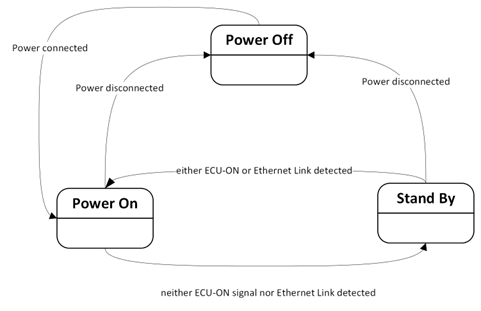
Power-On
When the M-ETK is powered up, a compatibility check of the M-ETK adapter is performed. In case of incompatibility, a recommendation will be made to change to an appropriate HSP version.
A handshake with the ECU will be made early in the boot process (Start-up Time 1). The complete system boot will occur in parallel (Start-up Time 2). For more information, see Hardware specifications.
Standby (Sleep)
If for a period of 500ms (or approx. 4.5 seconds after initial power on), there is no link on the network interface and no ECU-ON signal detected the system will change into a low power “standby” mode in the following manner.
-
The FPGA changes to a standby mode.
-
The Ethernet PHY is set to a standby mode; link detection is still possible.
For more information, see Hardware specifications.
Wake Up
When in Standby (Sleep) mode, the M-ETK will wake up when either one or both of the following occurs:
-
Voltage is detected on the ECU-ON connection.
-
A link/ traffic is detected on the Ethernet connection.
After waking, the M-ETK will boot as per the “Power On” mode.
LED Specification
There are three LEDs displaying the operating mode M-ETK:
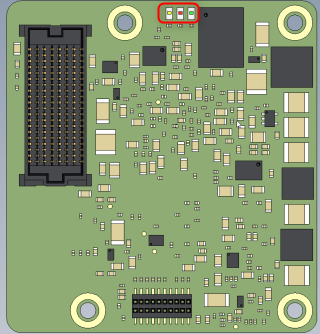
| LED | State | Definition |
| Red | On | M-ETK is supplied with power and active. |
|
|
Flashing |
Incompatible Adapter detected. Please refer to the HSP Tool or M-ETK Web-UI. |
| Green | Off | The Working Page is valid. |
| Flashing | Incompatible Adapter detected. Please refer to the HSP Tool or M-ETK Web-UI. | |
| On | The Working Page is invalid. | |
| Yellow | Off | ETK: Link Down. |
| On | ETK: Link Up. | |
| Flashing | Incompatible Adapter detected. Please refer to the HSP Tool or M-ETK Web-UI. |