Destination
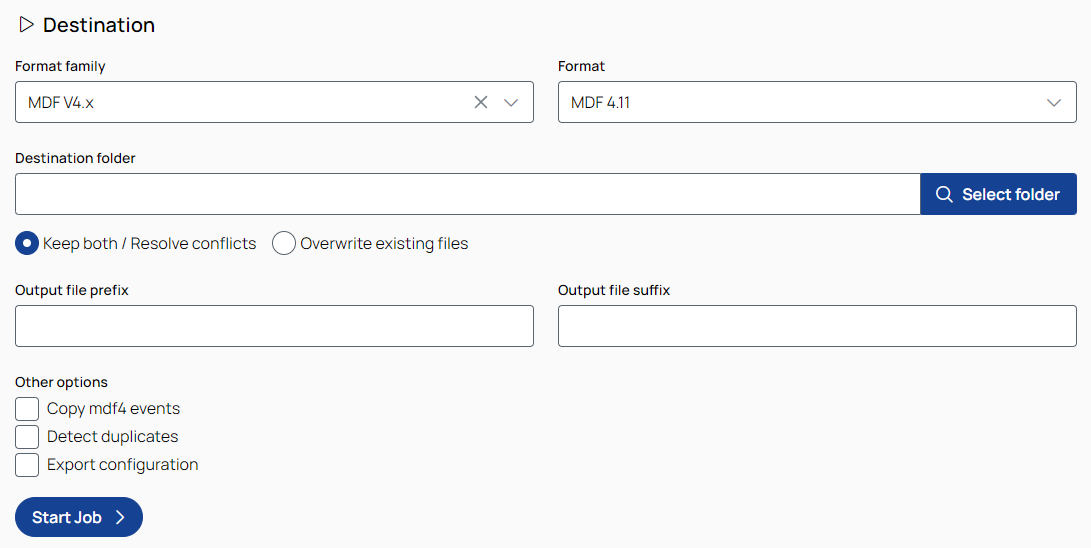
Format family
To select the destination file format family, use the drop-down list.
Format
To select the destination file format based on the selected format family, use the drop-down list.
Destination folder

Opens a folder selection dialog where you can choose the destination folder to save the destination file to. Alternatively, you can type the path in the input field.
Select an option to handle naming conflicts in the destination folder:
Keep both files (resolve conflicts): Keeps all files by appending a numeric suffix (e.g., _1, _2, etc.) to the new file name. The number increases automatically to avoid overwriting existing files.
Overwrite existing files: Overwrites existing files with the same name.
Output file prefix/suffix
In the input fields, enter a prefix/suffix you want to add to the file names.
Other options
Copy MDF4 events: Only relevant if both the source and destination file formats are MDF4. Copies the events from the source to the target MDF4 file.
Detect duplicates: Detects duplicate signals in measurement files. The results of this operation can be found in the job log.
Export job configuration: Saves the configuration with all settings as JSON file to the destination folder. It can be used with the Data Operator CLI or imported back into Data Operator, see Import a configuration.

Starts the job with all the settings you made and opens the Jobs progress step, where you can see the status of the job's progress.