Step 9: Export
In this step, the properties of the project and the experiment plan itself are displayed and can be exported to a file at this point.
In addition, the data can be displayed here as plots.
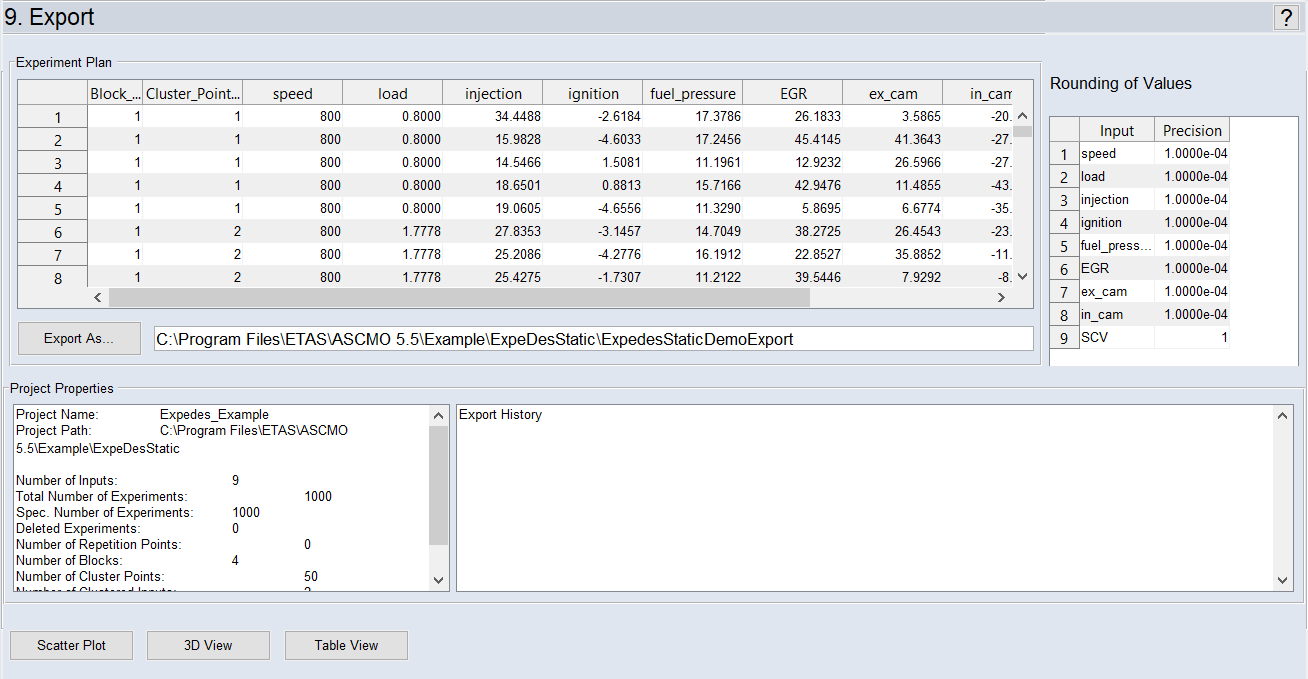
"Experiment Plan" Area
The complete experiment plan is displayed here as it as been created by ASCMO-STATIC ExpeDes according to the settings that were performed in preceding steps.
"Rounding of Values" Area
"Precision" specifies the precision with which the relevant value can be set with the system to be measured (e.g. the speed at an engine test bench).
"Project Properties" Area
In the "Project Properties" area, the properties of the project and the experiment plan are displayed in the left pane. The export history is displayed in the right pane.
Exporting the Plan
The plan can be exported with Export (or Export As). The export is carried out as an Excel file (*.xls) or a CSV file (*.csv) whose name can be selected during the initial export.
Viewer Area
This area provides access to functions for the graphical and tabular representation of the experiment plan. The functions can also be called up from the main menu of ASCMO-STATIC ExpeDes:
-
 Scatter Plot
 Opens the scatter plot window. The inputs of the experiment plan are displayed in pairs against each other.
-
3D View
Opens the "Experiment 3D View" window. In this window, points of the experiment plan can be displayed as three-dimensional plot.
-
Table View
Opens the "Experiment Table View" window. In this window, the points of the experiment plan are displayed as a table.
See also