Parameter Range Automated Machine Learning (ASCMO-DYNAMIC)
Model menu > Automated Machine Learning > Parameter Range button
In the Automated Machine Learning window you can specify the settings for the automated machine learning and the range of hyperparameters. In the Parameter Range Automated Machine Learning window there are separate tabs for the
The Parameter Range Automated Machine Learning window contains the following elements:
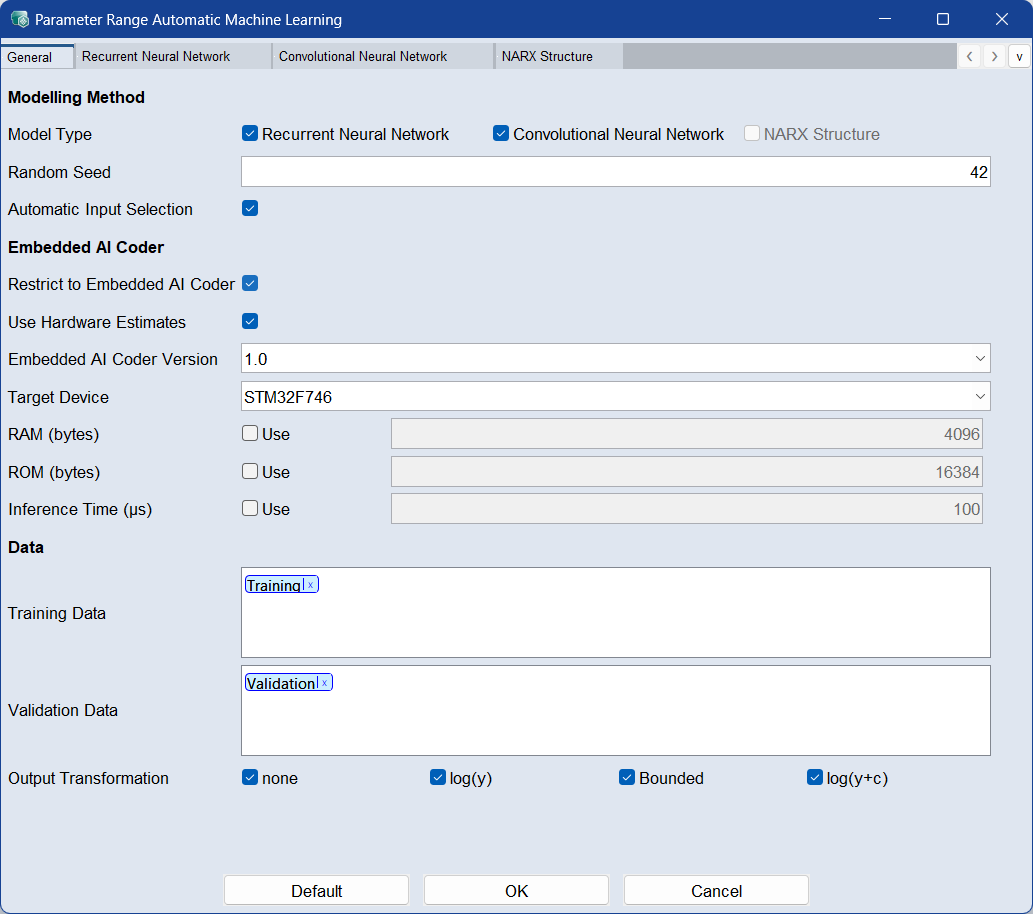
 General
Modeling Method
Model Type
Activate the checkboxes for the models you want to use for automated machine learning.
Automatic Input Selection
When enabled, the algorithm automatically selects only the most relevant input features. This helps balance model accuracy and complexity. The selection is based on the globally activated inputs, and each model uses a subset of them.
This option is ignored if only one global input is selected.
Random Seed
Enter a numeric value to initialize the random number generator.
Setting a fixed seed ensures reproducible training and validation results.
Embedded AI Coder
Use Embedded AI Coder options to make your AutoML process hardware-aware — ensuring models are optimized for real device constraints like processing power, memory, and inference time.
Hardware-aware model training designs models that fit the capabilities and limits of your target device for efficient deployment.
This requires a valid Embedded AI Coder installation.
Restrict to Embedded AI Coder
Activate the checkbox to limit automated machine learning settings to those currently supported by Embedded AI Coder. Settings and models not yet compatible will be excluded. See also,
Use Hardware Estimates
When enabled, the system estimates model resource requirements (e.g., RAM, ROM, inference time) based on hardware specifications provided by the selected Target Device.
-
Embedded AI Coder Version:Specifies the version of the Embedded AI Coder used for hardware estimates.
-
Target Device: Select a supported hardware device. The list of available devices depends on the selected Embedded AI Coder Version.
-
RAM (bytes): Defines the maximum available Random Access Memory (RAM) in bytes. Models estimated by Embedded AI Coder to exceed this RAM limit, based on the selected hardware specifications, are automatically skipped.
-
ROM (bytes): Defines the maximum available Read-Only Memory (ROM) in bytes. Models estimated by Embedded AI Coder to exceed this ROM limit, based on the selected hardware specifications, are automatically skipped.
-
Inference Time (µs): Specifies the estimated model inference time per evaluation step, in microseconds. This value serves as an approximate estimate. Models exceeding the defined limit are omitted, but allowing some tolerance is recommended since estimates may vary.
Data
Training Labels
Assign the labels you want to train the model on. If you use multiple labels, all data associated with at least one of the labels is used.
Assign a label by double-clicking the field and typing the name. Select the dataset from the list of suggestions.
Use the x on the label or Del to remove the label.
Validation Labels
Assign the labels of the data you want to use as validation data. If you use multiple labels, all data associated with at least one of the labels is used.
Assign a label by double-clicking the field and typing the name. Select the dataset from the list of suggestions.
Use the x on the label or Del to remove the label.
|
Note |
|---|
|
If the validation labels are not assigned to any data, the model is trained without validation. A message appears in the log window. You can assign labels to data in the Manage Datasets window. |
Output Transformation
Select the transformation type of the output. Using a transformation can improve the model prediction. Not all transformations are available if the training data has negative or zero values.
You can select from the following choices:
- none: no transformation
- log(y): logarithm
-
Bounded: limited to lower and upper bound
-
log(y+c): logarithm plus constant
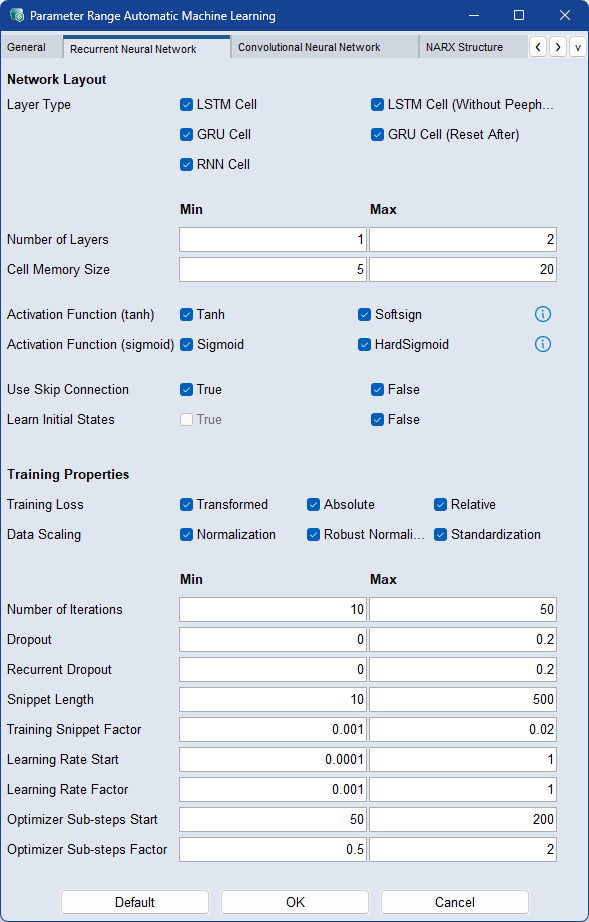
Model Setting: Recurrent Neural Network
Activate the
|
Note |
|---|
|
For a detailed description of the parameters see Model Configurations: Recurrent Neural Network (RNN) |
Activate the checkboxes of the elements to be used during the machine learning process:
-
Layer Type
-
Activation Function (tanh)
-
Activation Function (sigmoid)
-
Use Skip Connection
-
Learn Initial States: Learns the initial state of the RNNs based on the input and output values in the first time step.
-
Training Loss
-
Data Scaling
Enter the range of minimum and maximum values for the continuous parameters to be used during the automated machine learning process:
-
Dropout
-
Recurrent Dropout
-
Cell Memory Size
-
Number of Layers
-
Number of Iterations
-
Snippet Length
Training Snippet Factor : Enter a range that will be used as a factor for the training snippets. The value is used as a factor to calculate the size of the steps between the start positions of the snippets selected for the model training. So not all possible start positions for training snippets are taken, but every (factor * Lookback-Length)-th position as start position. Larger values result in a faster model training, smaller values results in a better model.
Learning Rate Start: Enter a range for the learning rate used by the optimizer during training. Larger values result in faster training.
Learning Rate Factor : Enter a range for the factor by which the final learning rate at the end of the training should differ from the start learning rate. Final Learning Rate = Start Learning Rate * Learning Rate Factor.
Optimizer Substep Start: Enter a range that splits the training data into smaller parts for which the optimizer is called separately. Larger values result in faster training. The value 1 yields the best model if the number of iterations is increased accordingly.
Optimizer Substep Factor: Enter a range for the factor by which the optimizer substeps at the end of the training should differ from the optimizer substeps at the beginning. Final Optimizer Substeps = Start Optimizer Substeps * Optimizer Substeps Factor.
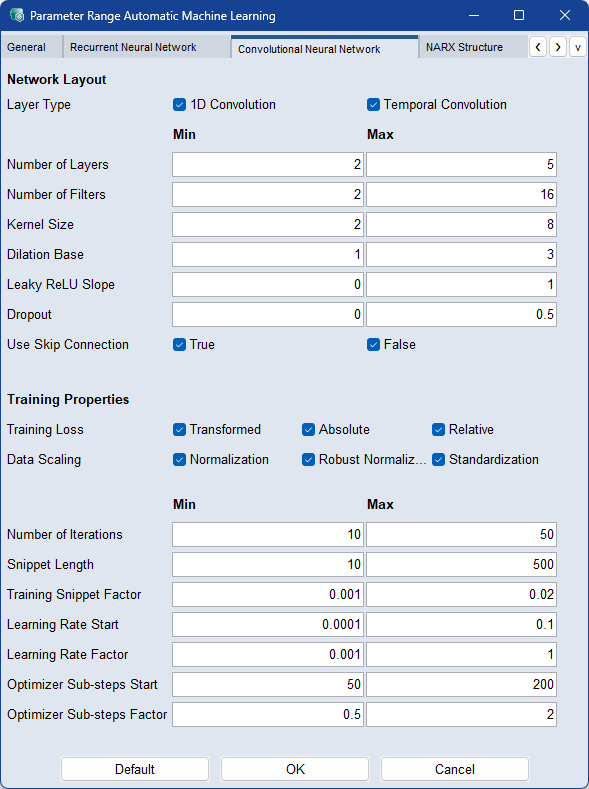
Model Setting: Convolutional Neural Network
Activate the checkbox on the General tab if you want to include this element in the machine learning process to find the best result. The more checkboxes you select, the longer it takes.
|
Note |
|---|
|
For a detailed description of the parameters see Model Configurations: Convolutional Neural Network (CNN) |
-
Layer Type
Enter the range of minimum and maximum values for the continuous parameters to be used during the automated machine learning process:
-
Number of Layers
-
Number of Filters
-
Kernel Size
-
Delation Base
-
Leaky ReLU Slope
-
Dropout
-
Use Skip Connection
Activate the checkboxes of the elements to be used during the machine learning process:
- Training Loss
-
Data Scaling
Enter the range of minimum and maximum values for the continuous parameters to be used during the automated machine learning process:
-
Number of Iterations
-
Snippet Length
-
Training Snippet Factor : Enter a range that will be used as a factor for the training snippets. The value is used as a factor to calculate the size of the steps between the start positions of the snippets selected for the model training. So not all possible start positions for training snippets are taken, but every (factor * Lookback-Length)-th position as start position. Larger values result in a faster model training, smaller values results in a better model.
-
Learning Rate Start: Enter a range for the learning rate used by the optimizer during training. Larger values result in faster training.
-
Learning Rate Factor : Enter a range for the factor by which the final learning rate at the end of the training should differ from the start learning rate. Final Learning Rate = Start Learning Rate * Learning Rate Factor.
-
Optimizer Substep Start: Enter a range that splits the training data into smaller parts for which the optimizer is called separately. Larger values result in faster training. The value 1 yields the best model if the number of iterations is increased accordingly.
-
Optimizer Substep Factor: Enter a range for the factor by which the optimizer substeps at the end of the training should differ from the optimizer substeps at the beginning. Final Optimizer Substeps = Start Optimizer Substeps * Optimizer Substeps Factor.
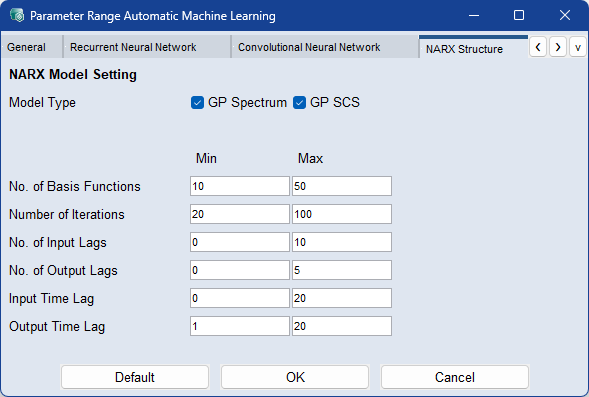
Model Setting: NARX
Activate the
|
Note |
|---|
|
For a detailed description of the parameters see Model Configurations: NARX Structure. |
Model Type
Activate the checkboxes of the model types to be used for automated machine learning.
Enter the range of minimum and maximum values for the continuous parameters to be used during the automated machine learning process:
-
Number of Basis Functions
-
Number of Iterations
-
Number of Input Lags
-
Number of Output Lags
-
Input Time Lag
-
Output Time Lag
 Default
Sets all parameters to their default values.
OK
Applies your settings and closes the window.
Cancel
Discards your settings and closes the window.
See also
Automated Machine Learning window
Model Configurations: Recurrent Neural Network (RNN)