Configuring External Cycle Snippets
To configure snippets of an external cycle for use in an ASCMO-DYNAMIC ExpeDes project, proceed as follows:
-
In the 5. Snippet Configuration pane, enter values for the minimum and maximum length of the snippets, as well as the minimum duration between snipprts.
-
Click on Import.
A file selection window opens.
-
In that window, enter or select path and name of the cycle file you want to import.
The following formats can be imported: Excel (*.xls, *.xlsx, *.xlsm), MDA Export (*.ascii), comma separated values (*.csv, *.txt), MDF (*.dat, *.mf4, *.mdf, *.mf3)
-
Click on Open.
If the file contains several work sheets, the "Select Sheet" window opens.
-
In that window, select the desired work sheet(s) and click on OK.
The
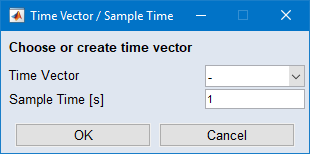
 "Time Vector / Sample Time" window opens.
 -
Do one of the following:
-
In the "Time Vector" combo box, select the column that contains the time.
-
In the "Sample Time" field, enter the desired sample time.
-
-
Click on OK.
The
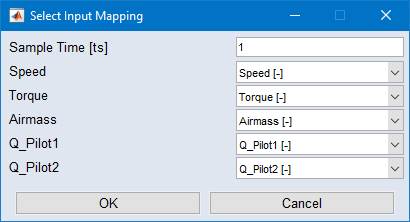
"Select Input Mapping" window opens. It lists the existing inputs, and allows to assign cycle data columns. -
In that window, assign the cycle data to suitable inputs, then click on OK.
The content of the file is imported. Snippets are inserted in the experiment plan according to your settings.
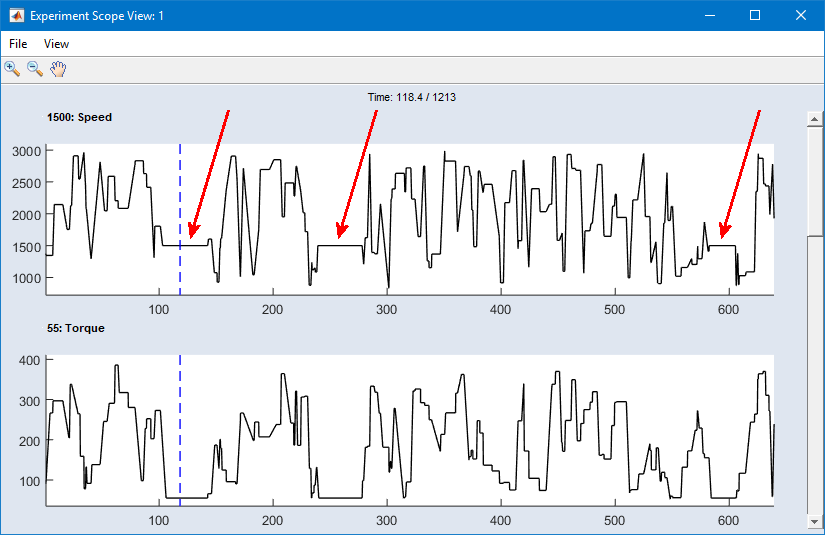
For demonstration purposes, a cycle file with constant values has been imported into an ASCMO-DYNAMIC ExpeDes project. Snippets are 20 - 40 ts long, and the minimum duration between two snippets is 100 ts. These demo snippets can easily be seen in the
scope view.
See also