Mapping Conversion
Prior to ASCET V6.4.6, messages used in AUTOSAR SWCs could be mapped to both SenderReceiver interface elements and NVData interface elements. Since ASCET V6.4.6, messages can only be mapped to SenderReceiver interface elements. Existing mappings of messages to NVData interface elements must be converted to NV data mappings.
When you open a database or workspace that contains mappings of messages to NVData interface elements, these mappings become invalid (see the example.) Mappings of messages to SenderReceiver interface elements or interrunnable variables remain valid.
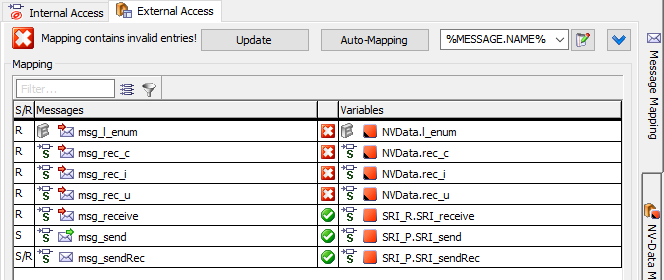
You must convert the invalid message mappings to NV-Data mappings. To make this easier, ASCET offers the Convert to NV-Data Mapping option in the Mapping menu or the context menu in the lower table of the External Access tab.
Mapping Conversion Rules
Convert to NV-Data Mapping converts mappings according to the following rules:
Only mappings of messages to NVData interface elements are converted.
Other message mappings remain unchanged.
In the following cases, mappings cannot be converted:
- The message is also mapped to an interrunnable variable in the Internal Access tab.
- The message is also mapped to a SenderReceiver interface element.
- The message is mapped to multiple NVData interface Rports.
The message is mapped to multiple NVData interface Pports.
Note
You cannot create NVData interface Pports in ASCET, but you can import ARXML files that contain NVData interface Pports.
Mapping Conversion Steps
The following happens during mapping conversion:
- Unsaved changes in the SWC are saved before mappings are saved.
- The messages involved in the mappings are converted to non-volatile variables with internal access set to read and write.
- If the mapped message is of scope imported, the exported counterpart and all other imported messages with identical name are converted to NV variables, too.
- Messages whose mappings cannot be converted are listed in the ASCET monitor window.
Converted mappings are deleted from the External Access tab.
Mappings that cannot be converted automatically remain in place. They must be converted manually.
- Converted mappings are re-created as mappings of the newly created NV variables to NVData interface elements.
- After the conversion is done, the SWC is saved.
- Converted messages and mappings are listed in the ASCET monitor window.
See also