Receiving from a Port with Status Request
Note |
|---|
This instruction applies only to implicit read access with status request. For an instruction to specify explicit read access with status information, see Receiving from a Port – Block Diagram or Receiving from a Port – ESDL. |
If your software component uses a SenderReceiver interface as Rport, you can specify a request for status information, i.e. the generation of the Rte_IStatus access macro, of an implicit read access.
- In the ASCET options window, Operating System\RTE-AUTOSAR 4.* node, configure the capabilities of your RTE generator.
- Open the SWC you want to edit.
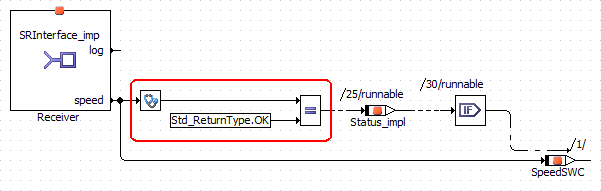
In the block diagram editor for SWCs, proceed
 as follows to specify the status request.
You can now specify appropriate behavior for the error case (see the
example).In the ESDL editor for SWCs,
proceed as follows to specify the status request.You can now specify appropriate behavior for the error case (as in the
example). - In the implementation editor of your SWC, AUTOSAR tab, set the attributes that control the generation of the Rte_IStatus macro.
- In the implementation editor of the accessed scalar/array/matrix or record data element, specify if the value may become invalid.

See also
Status of Explicit and Implicit Access
ASCET Options – Operating System Options
RTE Access Macros – Error Codes
Implementation Editor – AUTOSAR Tab (SWC)
Implementation Editor – AUTOSAR Tab (Scalar Elements)