Recorder
Note |
|---|
The recorder is not available for back-animation experiments. |
The recorder works in a similar fashion to the oscilloscope. The major difference is that the display area is not updated between passes. In an oscilloscope window, the content of the display area is deleted every time the output curves reach the right-hand side of the window.
This is not the case in a recorder window, the output curves remain on the display until they are overwritten explicitly. A cursor in the form of a white vertical line indicates up to which point the curves have been overwritten. The curves to the right of the line are those from the previous pass.
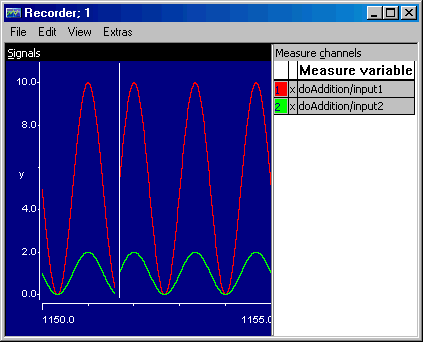
The only other difference between the recorder and the oscilloscope is that you cannot display a grid in the display area of a recorder window, because that grid would have to move with the cursor. The display options, measurement data analysis and trigger feature work in the same way as in the oscilloscope. However, only those parts of the curves belonging to the current pass are available for analysis. The parts to the right of the white line cannot be analyzed.
See also