Oscilloscope
Note |
|---|
The oscilloscope is not available for back-animation experiments. |
The oscilloscope provides a set of highly flexible display options, which are similar to those of a real oscilloscope. It is often a good idea to open several oscilloscope windows at the same time, as too many channels can clutter up the display.
When you use the oscilloscope, you usually start by setting up the display options, i.e. define the way the various values are shown in the window. During the experiment you can perform various operations on the data displayed, e.g. store it, analyze it, define triggers etc.
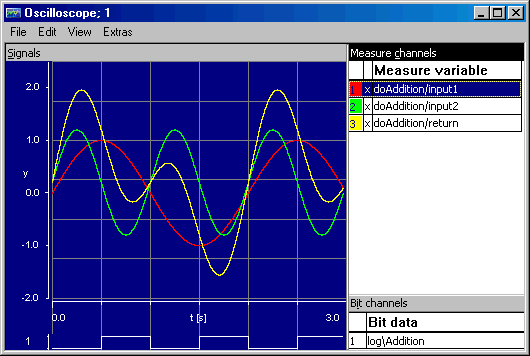
The Signals pane shows the curves for the numerical values being measured. Underneath is the Bit Channels display area which shows the logical values being measured. To the right of the Signals pane is the Measure Channels field, where the names of the channels are displayed, together with various user-definable pieces of information about them. The following illustration shows the oscilloscope in the offline experiment environment.
See also