Conditional Table Editor
A conditional table maps logical behavior (in the same way as the Boolean table). Its columns and rows create a logical matrix with different conditions and instructions.
Basic elements can be used in a conditional table. It is also possible to access public methods of added classes. The functionality of a conditional table is the equivalent of an If…Then…ElseIf…Then construction. Every line corresponds to an If or Elseif query. The below figure shows an example of a conditional table. The first three columns ("cont", "log" and "enum_1") contain the conditions linked by AND, the following columns ("out", "limitInt" and "methods") contain the relevant instructions.
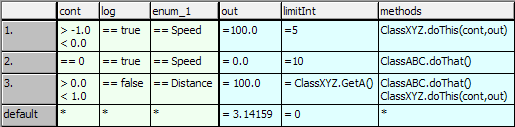
The example in the figure corresponds to the  following ESDL code.
A conditional table is activated by calling a trigger method. On activation, the relevant row is detected and the instructions and calculations contained in it are executed.
Conditional tables are ESDL classes which are specified in a special editor for conditional tables. Conditions and instructions are entered in two separate areas of the table, condition and instruction area. Each area has an adjustable number of columns and its own freely selectable background color (set in the ASCET options window, Table node).
See also