Showing and Hiding Confirmation Dialog Windows
To change the visibility of a confirmation or hint window, proceed as follows:
- In the ASCET options window, open the Confirmation Dialogs node.
- In the Confirmation Dialogs or Hint Dialogs field, double-click the entry in the Decision column next to the desired option.
Select an entry from the combo box.
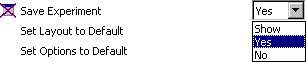
From now on, the confirmation/hint window is treated according to the selection.
See also