Toolbar Elements – CT Block Editors
The Elements toolbar contains buttons to create CT block elements.
The following buttons are available for all CT block editors:
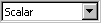
| combo box to select the dimension – Scalar or Array (see also Creating an Array in a CT Block) – for inputs, outputs, step-local variables, and scalar parameters |
| Input (dimension is selected in the combo box) |
| Output (dimension is selected in the combo box) |
| Constant (dimension is selected in the combo box) |
| OneD Table (characteristic line) |
| TwoD Table (characteristic map) |


The following buttons are only available in the C code and ESDL editors for CT blocks:
| Steplocal Variable |
| Parameter (dimension is selected in the combo box) |
| Dependent Parameter (dimension is selected in the combo box) |
| Discrete State (dimension is selected in the combo box) |
| Continuous State (dimension is selected in the combo box) |
| Continuous Variable |


The following buttons are only available in the block diagram editor for CT blocks:
| Global Parameter (dimension is selected in the combo box) |

See also