Showing and Deleting Unused Inputs
To delete inputs not used in the Boolean table, proceed as follows:
In the Extras menu, select Show Unused Elements.
The table is checked for conflicting combinations.
If conflicting combinations are found, they are marked with red borders. Proceed as described in Checking the Table.
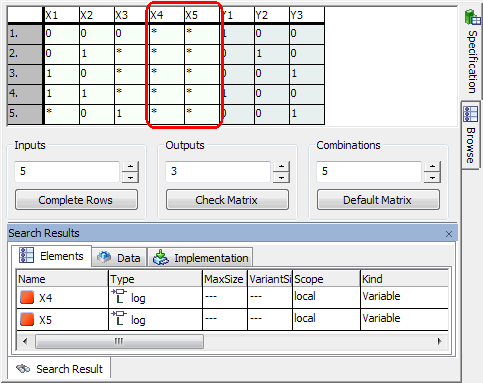
If no conflicting combinations are found, the "Search Results" view opens. It shows all elements listed in the "Outline" tab, but not used in the Boolean table.
An input is
 unused in the Boolean table (i.e. does not appear in the generated ESDL code) if all its values are set to * (undefined).
- To delete an unused input, proceed as described in Deleting Inputs and Outputs or Combinations.
See also