Checking the Table
If you have inserted the input and output values manually, or if you have deleted inputs or outputs, you should check the table for consistency.
When you have set up the table according to your wishes, click the Check Matrix button.
If different output values are assigned to combinations with identical input values, the respective lines are marked with red borders.
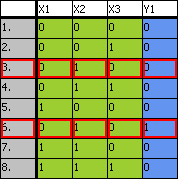
Select one of the conflicting combinations, then open the Combinations menu and select Delete.
The selected combination is removed.