Using Numbers Already Assigned
If you want to assign an existing combination of process/method or statement block and number to a normal or block-local sequence call, or an existing number to a connector (in the Sequence Editor or when incrementing/decrementing), the  following warning is displayed.
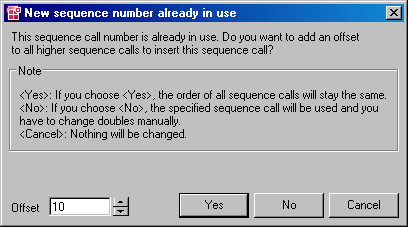
It is possible to shift the existing number as well as all higher numbers by an offset which can be defined. The order of the shifted sequence calls is retained.
To assign the existing combination anyway, click No.
This can be useful if the first occurrence of the combination was a mistake, e.g. if the wrong number was entered.
Note
You have to edit the double sequence calls manually to resolve the conflict. Otherwise corresponding error messages are created during code generation.
To shift the existing number and all higher numbers, do the following:
In the Offset field, set the value for the offset of the sequence calls.
The value of the Sequence Shift Offset option from the ASCET option window is preset.
Click Yes.
The edited sequence call is assigned the values set in the Sequence Editor. The other sequence call as well as the sequence calls with higher numbers which belong to the same process/method are shifted by the value specified under Offset
To set another value, do the following:
- Click Cancel to return to the Sequence Editor.
- In the Sequence Editor, set a combination which has not yet been assigned.
See also