Sequence Calls
A sequence call is linked to each assignment operation and each method call of an included component. Each sequence call represents an instruction in an ASCET diagram. Sequence calls determine the control flow in diagrams by assigning every instruction to a method or process, and determining the order of the instructions within a method/process.
In the Block Diagram Editor, connecting lines between elements and/or operators are shown as colored lines as long as the sequencing for the instruction or operation linked to the element has not been resolved. The color indicates that the sequencing still has to be resolved. All lines to which a sequence call has been assigned are shown in black.
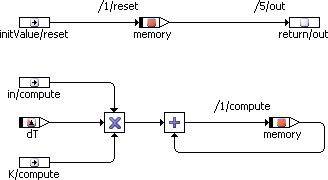
You can edit the sequence calls individually or in groups, manually or automatically.
Connectors are used to connect an assignment with a control flow instruction such as If Then or If Then Else.
Editing Individual Sequence Calls
Individual sequence calls can be
Automatic assignment, as well as the Next free button in the sequence editor, use a
Editing Several Sequence Calls
A large number of sequence calls may be necessary in complex diagrams. In that case, the possibilities to edit sequence calls in groups can be helpful. You can edit all sequence calls in a selected part of the diagram, all sequence calls assigned to a selected method/runnable, or all sequence calls in a complete diagram.
The sequencing algorithm uses a logical model graph that is computed from the inputs and outputs of all graphical elements. The algorithm tries to find dependencies between the graphical elements, but severe restrictions apply.
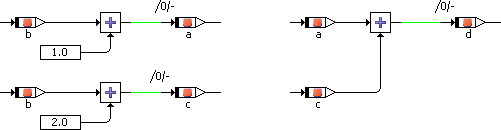
independent subgraphs
One diagram can have several independent subgraphs. The order the sequencing algorithm assigns to the independent subgraphs cannot be predicted.
 EXAMPLE
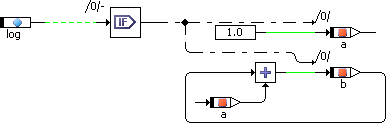
control flow elements
If the branch of a control flow element is connected to more than one action, the sequencing algorithm cannot decide which action has to be computed first. The sequence numbers of the connectors are assigned arbitrarily.
EXAMPLEseveral methods/processes
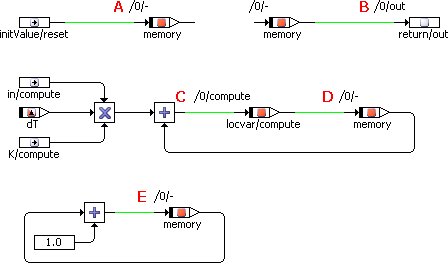
One diagram can contain several methods or runnables. Elements that belong to a method or runnable (i.e. arguments, return values, method-/runnable-local variables) can be used only in that particular method or runnable, but all other elements can be computed in any method or runnable. For these elements, the sequencing algorithm tries to determine a method/runnable by checking whether the inputs/outputs of a computation chain belong to a particular method/runnable. If that check fails, any method/runnable can be used.
EXAMPLE
See also
Editing Individual Sequence Calls