Positioning an Operator
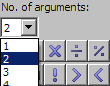
In the
 No. of arguments combo box in the Basic Blocks palette, select the number of inputs for the operator.
 Note
For some operators (e.g. division, subtraction, comparison operators) the number of inputs cannot be changed. In these cases, the selection has no effect.
In the Basic Blocks palette, select the operator you want to create.
This loads the mouse cursor with that operator.
Click inside the drawing area to position the operator.
The operator is added to the diagram. You can adjust its position by dragging it to another position.
The flow of information in diagrams is determined by connecting the items in the drawing area.
See also