Basic Scalar Elements
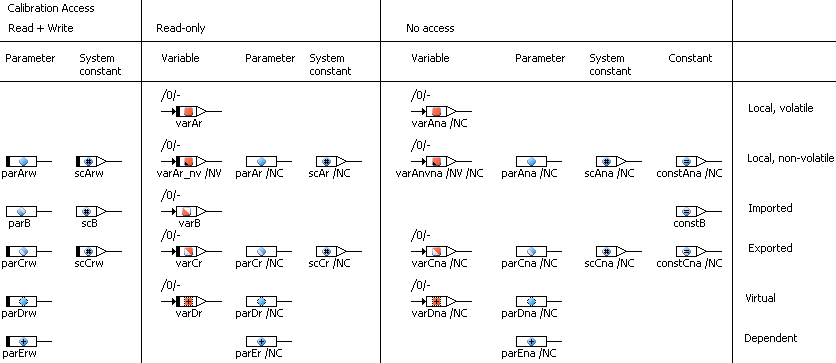
Basic scalar elements have one argument pin for setting a new value (if their value can be set), and one return pin for reading the current value. The icon inside the block represents the kind of the element: variables are marked by a square, parameters are marked by a circle. Smaller overlay icons are used to mark constants, system constants, virtual elements, non-volatile variables and dependent parameters. User-defined subkinds of system constants can have a user-defined overlay icon.
The scope of an element is also indicated by the icon: a fully colored icon represents a local element, an icon with a colored lower-left half represents an imported element, an icon with a colored upper-right half represents an exported element.
If the kind of the basic scalar element does not permit writing to it (e.g. parameters), the corresponding pin is missing.
Parameters with calibration access set to read/write and variables with calibration access set to read-only are marked with a black bar at the left side.
Imported elements will inherit their properties from their exported counterparts.
See also