
AoU: ETAS_RTACAR_SM_RTE_036
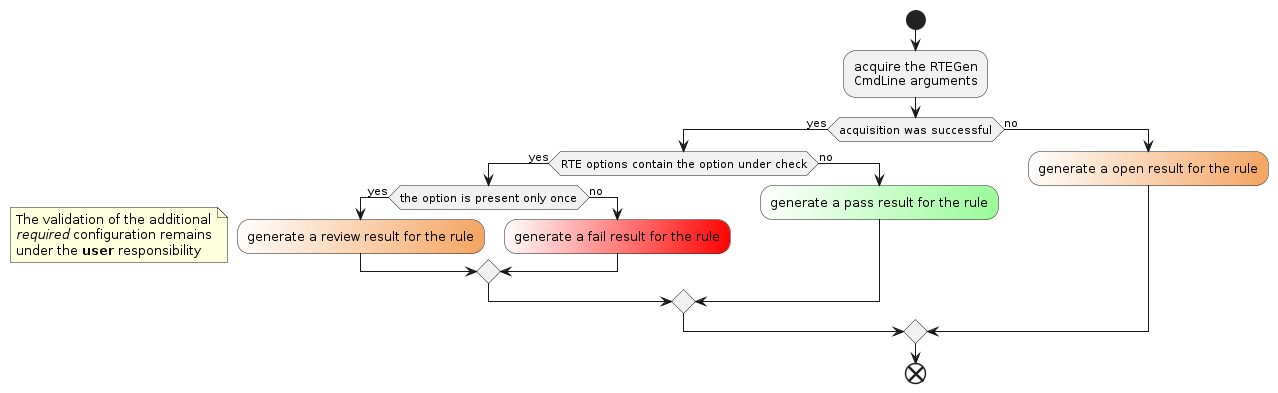
The validation of AoU ETAS_RTACAR_SM_RTE_036 is performed by analyzing the RTEGen tool log file.
The goal is to verify that the `–client-server-global-optimization` option is not used in the RTEGen tool command line, or to notify that additional conditions must be validated by the user if the option is present in the command line.
Rule Id |
ETAS_RTACAR_SM_RTE_036 |
|---|---|
Title |
If the –client-server-global-optimization option is enabled, additional restrictions must be followed. |
Description |
This rule checks the correct handling of the RTEGen tool calling option ‘–client-server-global-optimization’. |
Message Description
Id |
id_000 |
Message |
The rule can’t be evaluated because the applied RTEGen log file cannot be processed or there is an internal exception during command execution. Please refer to the log file for more detailed information. |
Kind |
Open |
Level |
None |
Description |
An issue was detected while processing the log file provided with the mandatory ‘–rte-log-file’ parameter. The cause may be that the referred file does not match the expected log format, the access to the file is blocked by another process or an internal exception during the ‘check-rte-options’ command execution occurs. Details about the reason could be found in the RTA-SQF log file. |
How To Fix |
Check that the file referenced by the ‘–rte-log-file’ parameter is the expected log file from the RTEGen tool and check that the file is accessible. Restart the command to exclude any kind of internal exception. |
Id |
id_001 |
Message |
The ‘–client-server-global-optimization’ RTEGen command-line option is not used or is set to the disabled state, which are both allowed behaviors. |
Kind |
Pass |
Level |
None |
Description |
This message represents the expected behavior of the rule ETAS_RTACAR_SM_RTE_036. |
How To Fix |
Nothing to do. |
Id |
id_002 |
Message |
The ‘–client-server-global-optimization’ RTEGen command-line option is enabled. Please carefully consider the effects on memory protection. |
Kind |
Review |
Level |
None |
Description |
The ‘–client-server-global-optimization’ RTEGen command-line option was activated when calling the RTEGen tool. The user must be aware that enabling the client-server global optimization may have an impact on memory protection. |
How To Fix |
Refer to the RTA-RTE Reference Manual and follow the constraints described there. |
Id |
id_003 |
Message |
The ‘–client-server-global-optimization’ RTEGen command-line option is set multiple times which is an invalid behavior. |
Kind |
Fail |
Level |
Warning |
Description |
According to the RTA-RTE Reference Manual, the ‘–client-server-global-optimization’ RTEGen command-line option can be set to the values ‘0’ (to disable the feature) or ‘1’ (to enable the feature). Therefore, it makes no sense to set the option multiple times. The ‘check-rte-options’ command applies this message if the option is set multiple times which is an invalid behavior. |
How To Fix |
Call the RTEGen tool only with a maximum of one use of the ‘–client-server-global-optimization’ command-line option. Check the setup or configuration of the call of the RTEGen tool to ensure that condition. If the option is not set the feature is disabled by default. |