
AoU: ETAS_RTACAR_SM_RTE_004
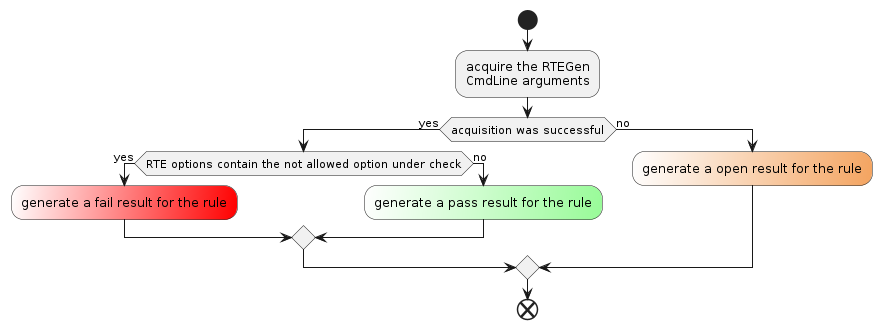
The validation of AoU ETAS_RTACAR_SM_RTE_004 is performed by analyzing the RTEGen tool log file. The goal is to ensure that the `–disable-warning` option is not used in the RTEGen tool command line.
Tip
The mandatory option rte-log-file specifies the path to the RTEGen tool log file.
Rule Id |
ETAS_RTACAR_SM_RTE_004 |
|---|---|
Title |
The –disable-warning RTEGen option must not be used. |
Description |
This rule checks the correct handling of the RTEGen tool calling option ‘–disable-warning’. |
Message Description
Id |
id_000 |
Message |
The rule can’t be evaluated because the applied RTEGen log file cannot be processed or there is an internal exception during command execution. Please refer to the log file for more detailed information. |
Kind |
Open |
Level |
None |
Description |
An issue was detected while processing the log file provided with the mandatory ‘–rte-log-file’ parameter. The cause may be that the referred file does not match the expected log format, the access to the file is blocked by another process or an internal exception during the ‘check-rte-options’ command execution occurs. Details about the reason could be found in the RTA-SQF log file. |
How To Fix |
Check that the file referenced by the ‘–rte-log-file’ parameter is the expected log file from the RTEGen tool and check that the file is accessible. Restart the command to exclude any kind of internal exception. |
Id |
id_001 |
Message |
The ‘–disable-warning’ RTEGen command-line option is not used which is the expected behavior. |
Kind |
Pass |
Level |
None |
Description |
This message represents the expected behavior of the rule ETAS_RTACAR_SM_RTE_004. |
How To Fix |
Nothing to do. |
Id |
id_002 |
Message |
The ‘–disable-warning’ RTEGen command-line option is used and set to the value ‘{0}’ which is an improper behavior. |
Kind |
Fail |
Level |
Error |
Description |
It is not allowed to use the ‘–disable-warning’ RTEGen command-line option. The message appears if the option was used when calling the RTEGen tool. It is possible that the message appears multiple times, as often as the option was used. The used value of the option is shown in the message text as term ‘{0}’. |
How To Fix |
Call the RTEGen tool without the ‘–disable-warning’ command-line option. Check the setup or configuration of the call of the RTEGen tool and avoid that the option is used. |