ProF ControlFlow String in ProF Settings Dialog
The INCA COM API functions FlashHexFileWithControlFlow and FlashHexFileWithControlFlowOnFlashPort require a ControlFlow string input parameter that defines the path to the installed ProF configuration to be used for flashing and a list of its individual flash parameters
In the past, this string could only be determined by flashing manually and then looking for the ControlFlow string in the TgtSvr.log file
Now, the ControlFlow string is displayed in the ProF window and can be copied easily.
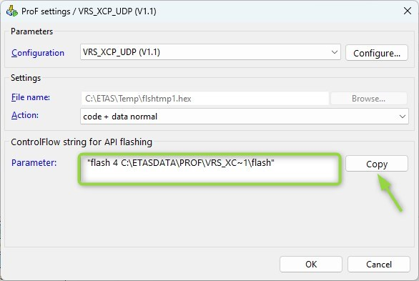
Install and select the ProF configuration to be used for API flashing > configure its parameters to be used for API flashing > press Copy and insert the string in your API script.
See also