KVASER Hardware
Note |
The operation of the KVASER hardware requires a computer driver which is provided with the hardware by the hardware manufacturer. To utilize the KVASER hardware, it is essential to install the INCA-KVASER hardware add-on alongside the INCA software. For more information, see the INCA Installation Guide. |
All devices of the KVASER hardware support the classic CAN bus.
The following devices are available:
|
Each KVASER module supports the following devices below the CAN controller:
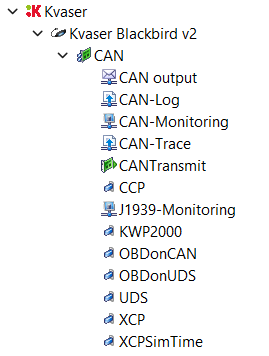
System limits
INCA supports up to four equal KVASER hardware modules simultaneously.
Fixed settings of the CAN controller:
Bus participation mode: always active
Self reception: always disabled
Even if the module supports CAN FD, the current INCA Service Pack version doesn't support it yet.
Module parameters
 Parameters tabName
Enter any name for the hardware module.
Serial numberShows the serial number read from the device.
If the hardware is not connected or if it was not found during the hardware search, enter the complete number by hand (it can be found on the device).
The serial number must be entered as it is needed by INCA to identify the device. The serial number is stored in the hardware configuration.
Firmware versionThis field is empty.
INCA hardware communicationShows the hardware communication protocol for the respective module:
USB, PCIe, Ethernet, or Virtual (KVASER)
Application options
Via the CAN interface:
Working in the Hardware Configuration Editor