YT and XY Oscilloscope Window
This window contains the following frames:
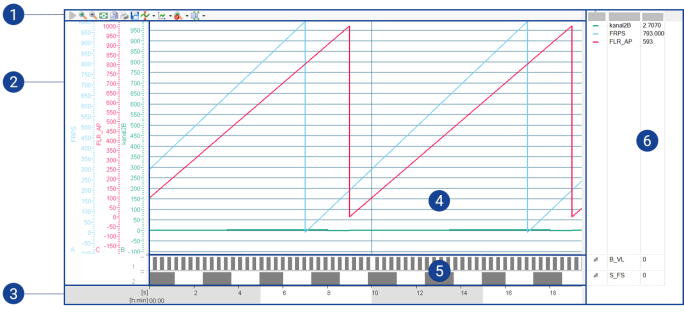
Toolbar
Contains commands and setting options for displaying measure variables.
Axes
Displays the measure variable y-axes. A y-axis is possible for each measure variable.
Horizontal Axis
Displays the time in YT oscilloscopes and the measure variable scale in XY oscilloscopes.
Display area (analog strip)
Presents analog measure variables graphically. One analog strip may contain many measure variables. Multiple strips can be displayed one above the other.
Display area (digital strip)
Presents digital measure variables. A digital strip may contain only one measure variable. The scale of a digital strip is always 0 to 1.
Signal list
Displays the used measure variables. The measure variables are displayed next to the analog or digital strip used for display.
The frames can be expanded or decreased at will by pulling the gray border bars. Frames can be completely covered. By dragging the corresponding bar, you can make it visible again.
See also
Properties for YT and XY Oscilloscopes
Experiment Environment - Configuring Measure Variables in YT- and XY-Oscilloscopes