Treating Measurements as Calibration Variables
In an early phase of the calibration process, situations may occur in which not all measurements are available due to missing real sensors. In this case, it is possible to treat measurements like calibration variables and selectively modify them (stimulation), thus simulating measurements such as high mileages or unusual measured values for test tasks.
To be able to treat a measurement as a calibration variable:
In the INCA user options, activate the calibration of measurement variables by setting the option Enable Calibration of Measurements to Yes and then clicking OK.
The option is located in the user options under Experiment - Calibration - General.
Open the Experiment Environment.
Note
If the experiment environment is already open, you must restart it to apply the modified option settings to the experiment.
Open the Variable Selection dialog.
In the variables selection dialog, a virtual device with the same measurements as in the output ECU is additionally created for every ECU project; the name of the virtual device is built from the name of the original device plus the suffix #RAMcal. Example:
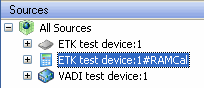
The variables are identified by the symbol for adaptive parameters,
 . They can be added to all available calibration windows, including the calibration scenario editor, and are handled the same way as other adaptive parameters.
Select the measure variables that you want to simulate by treating them as calibration variables. Proceed in one of the following ways:
- In the Sources list, select the virtual device. Then select the variables you want to modify and add them to calibration instruments.
- Select the entry All Sources in the Sources list. Then click on the toolbar icon for adaptive parameters in order to filter the list of variables. Select the variables you want to modify and add them to calibration instruments.
- Click OK to close the Variable Selection dialog and create the calibration instruments.
- Make sure that the Working Page is selected.
- Calibrate the measurements that you have added to calibration instruments in order to simulate the desired values.
You can also
Copying Calibration Values to Calibration Window